
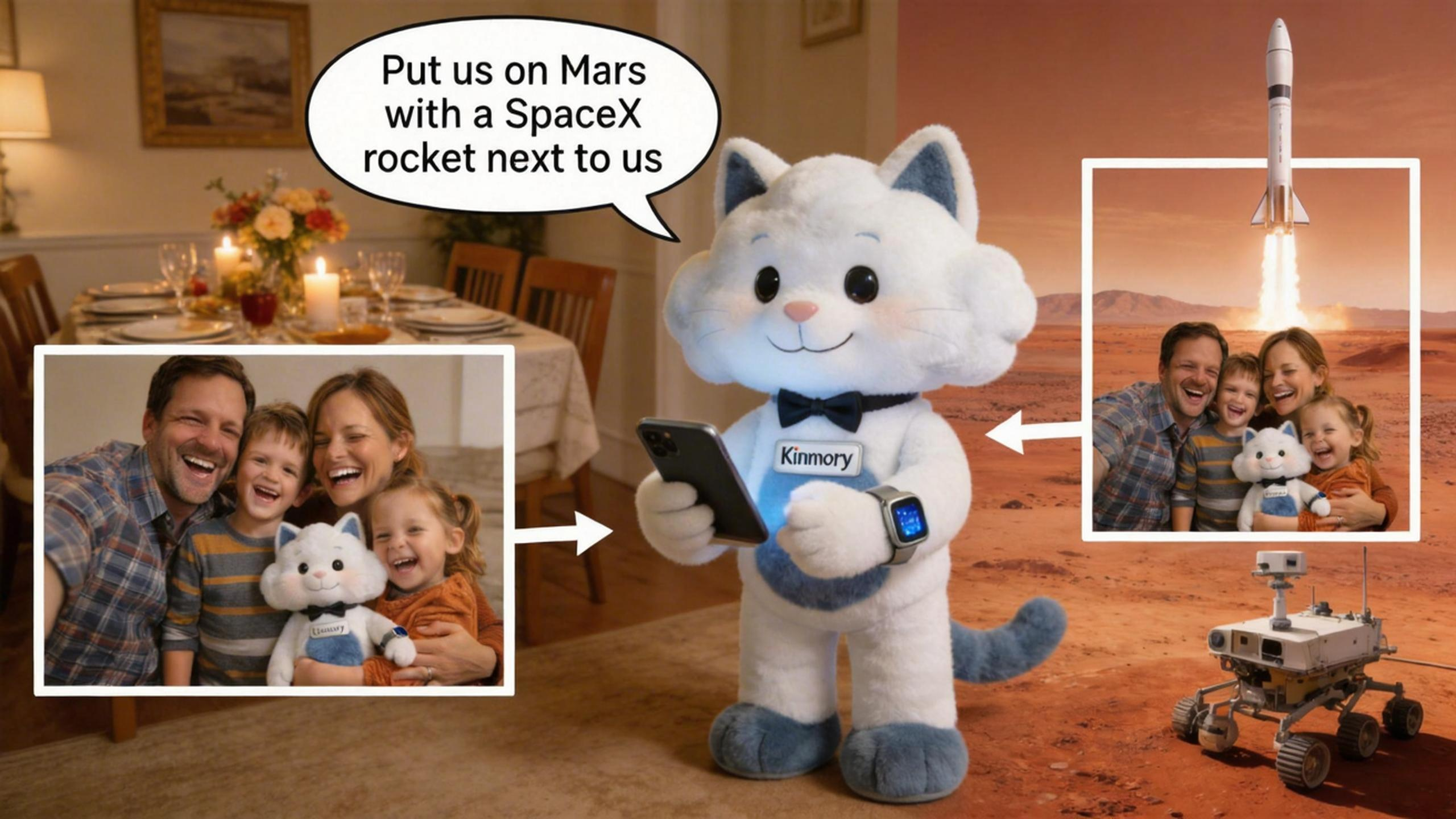
AI Photo Creation That Takes Your Family Anywhere
Change any photo background with your voice — Mars, space, underwater, anywhere. No Photoshop. No designer. Just say the word, and Kinmory handles the rest.
AI Photo Creation That Takes Your Family Anywhere
Change any photo background with your voice — Mars, space, underwater, anywhere. No Photoshop. No designer. Just say the word, and Kinmory handles the rest.
There's a photo on my phone from last Thanksgiving. Everyone's laughing, the lighting is actually good for once, and somehow nobody blinked. It's perfect. It's also sitting in a folder, completely forgotten, slowly buried under 4,000 more photos of nothing.
Sound familiar? We take more family photos than any generation in history — and we do almost nothing with them. They live on our phones, maybe auto-upload to some cloud, and that's usually the end of the story.
Kinmory thinks that's a waste. Not just of storage space, but of something genuinely irreplaceable: the visual record of your family's life together. And their latest feature — AI Photo Creation — might be the first thing that's actually made me excited to open my family album in years.
"We don't want your photos to be memories you look back on. We want them to be adventures you keep having."
The idea behind Kinmory AI CreationHere's How It Actually Works
There's no learning curve. No tutorials to watch. No complex interface to figure out. You just… talk to Kini. Here's what the whole experience looks like, start to finish:
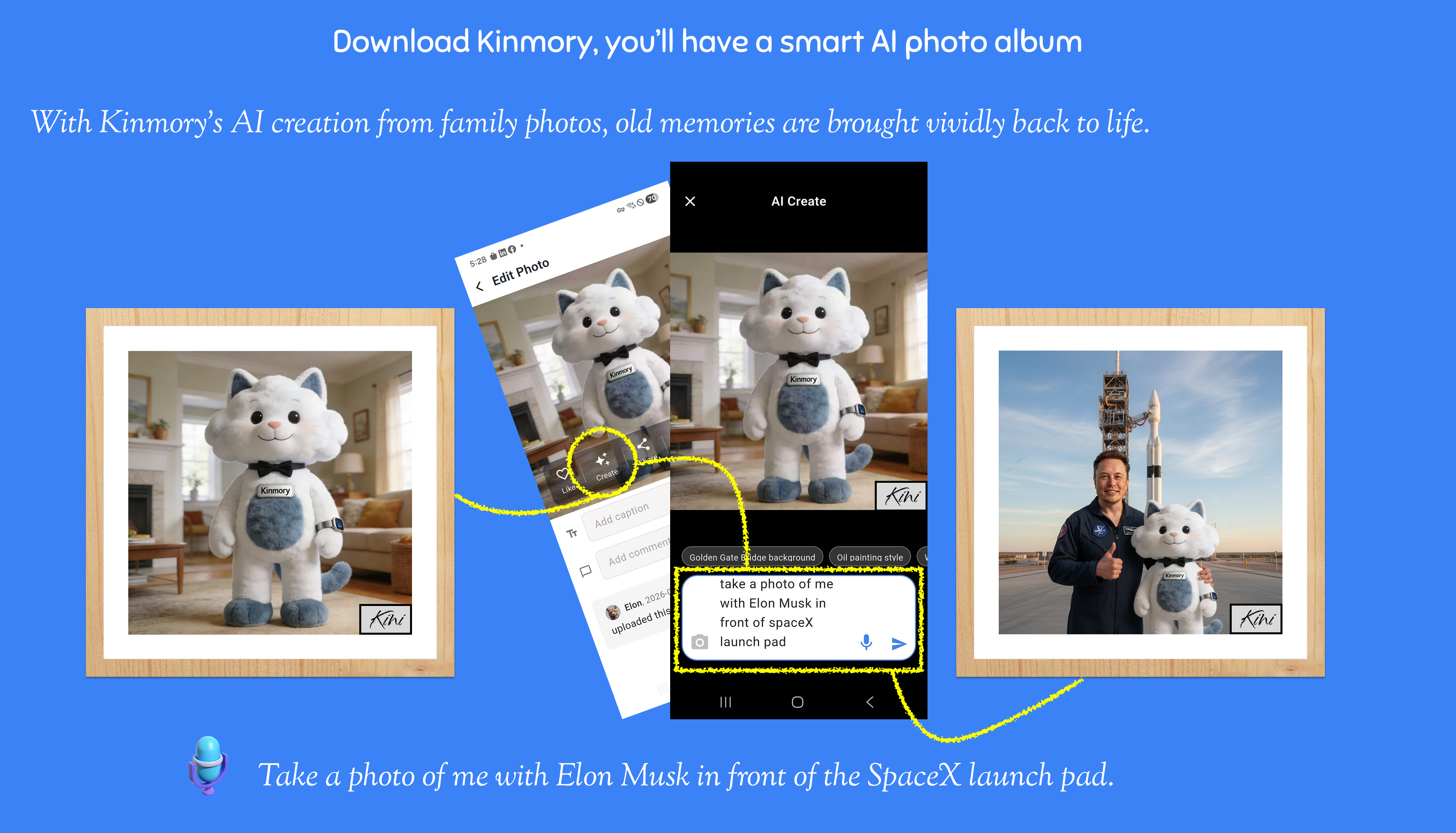
Why This Is Different
There are plenty of AI photo editing tools out there. Most of them ask you to write a detailed prompt, adjust sliders, pick a style, re-generate three times, and still end up with something that looks a little off. They're built for people who enjoy tinkering with technology.
Kinmory's AI Creation is built for everyone else. The parent who just wants to do something fun with their kids on a Saturday afternoon. The grandparent who wants to surprise the family with something delightful. The person who has zero interest in learning how AI image generation works, but would love the result of it.
You talk. Kini listens. You get something wonderful. That's the whole experience.
Your creations, everywhere you look
Save once. Display everywhere. From kitchen tablet to living room screen.
The Thanksgiving photo I mentioned at the beginning? I tried it. Told Kini to put my family on the moon, with Earth visible in the background. My kids — ages 8 and 11 — lost their minds. They wanted to do ten more. We spent an hour going to the bottom of the ocean, the top of Everest, inside a snow globe, and somehow, inexplicably, inside a giant bowl of ramen.
It became an activity. Not just a feature I was testing. An actual, genuinely fun thing to do together on a Tuesday night. I haven't felt that way about a tech feature in a long time.
"We spent an hour going to Mars, the bottom of the ocean, the top of Everest — and inside a giant bowl of ramen. It became an actual activity."
A Kinmory family, just doing a TuesdayRelated reading
- TimeTree vs Cozi (2026): Which Family Calendar Wins?
TimeTree vs Cozi in 2026: real prices, free tiers, features, and who each family app is for — plus where an AI option like Kinmory fits.
- The ADHD App Graveyard: Why Productivity Tools Don't Stick
Abandoned planners aren't a discipline problem. A calendar's input box sits after the hard thinking—so it offloads the cheapest part and adds a step.
- Intention Offloading: The Science of External Reminders
External reminders cut forgetting from about 45% to 5%. The surprising part: people already offload more than is optimal — and they know why they do it.
- ADHD and the Mental Load: A Gap in the Research (2026)
Cognitive labor has been studied with gender as the variable — never executive function. We map four literatures and the gap where ADHD households fall.
Bring your family's plans into one place.
Use Kinmory on the web or phone to share calendars, tasks, meals and the information your household needs next.

Scan to Download
Point your camera here
kinmory.ai/download/kinmory