
Skylight vs Kinmory (2026): Buy a Screen or Reuse a Tablet
Skylight vs Kinmory, honestly compared: a $300+ dedicated wall screen versus turning a tablet you already own into a family wall calendar.
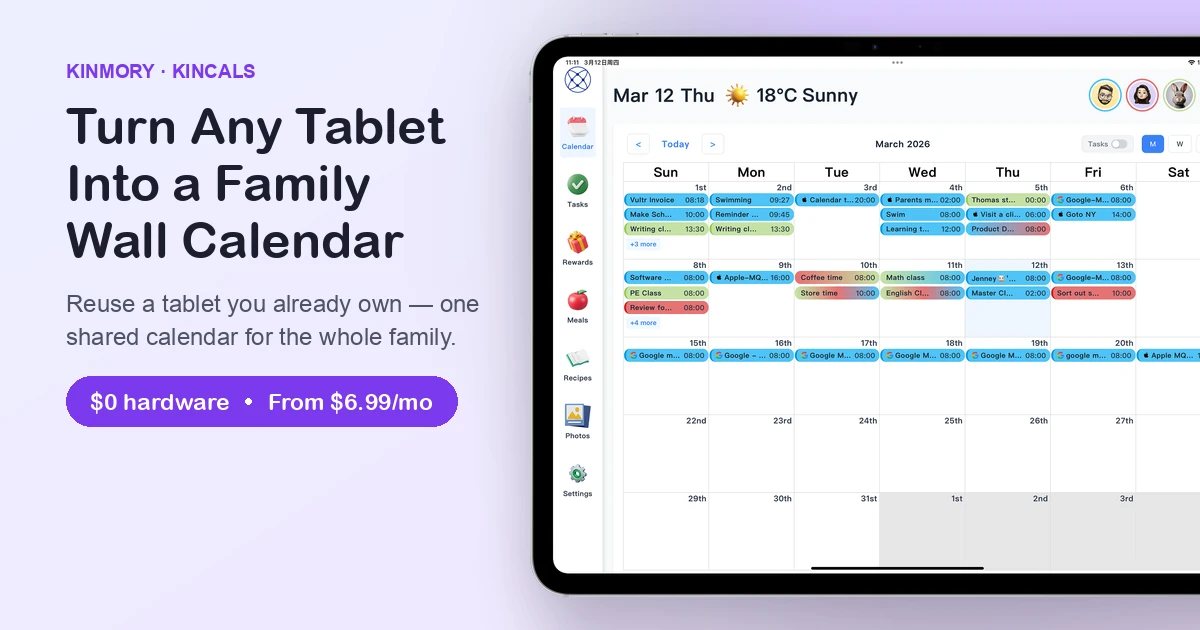
Choosing between Skylight and Kinmory for your family calendar? For most families the winner is Kinmory + KinCals — it turns an Android tablet, smart screen or old iPad you already own into a shared family wall calendar, so you skip Skylight's $170–$630 hardware. Meal planning and chores are free, and everyone gets a real app on their own phone.
Skylight is a polished product, but two things give families pause: the screen itself costs $170–$630, and the features most families actually want — meal planning and the chore/reward system — sit behind a $79/year "Skylight Plus" subscription. It's also a single wall panel, not an app in everyone's pocket.
The two at a glance
Skylight Calendar
A dedicated touchscreen you buy and mount on the wall. The 15" runs about $300, and meal planning plus the chore/reward system need the $79/year Skylight Plus subscription. At its core, it's one screen on a wall.
Kinmory + KinCals
Install KinCals on a tablet or old iPad you already own and it becomes the same always-on family wall calendar. Calendar, tasks, rewards, meal planning and grocery lists are free; the wall display runs on AI Plus (~$70/year). Plus everyone gets a full phone app.
Skylight vs. Kinmory + KinCals
| Skylight Calendar | Kinmory + KinCals | |
|---|---|---|
| Hardware to buy | $170–$630 touchscreen | None — reuse a tablet / old iPad |
| Cost to get the wall calendar | ~$300 device + $79/yr | AI Plus ~$70/yr, no device |
| First-year cost | ~$379 | ~$70 |
| Meal planning | Paid ($79/yr Plus) | Free |
| Chores & rewards | Paid ($79/yr Plus) | Free |
| Phone app for each member | Limited companion app | Full iOS/Android apps |
| AI features | Magic Import (paid) | AI recipes, photo tools, Memory Notes |
| Calendar sync | Google / Apple / Outlook | Google / Apple / Outlook (two-way) |
| Try before you commit | Buy & return | KinCals demo mode |
How Kinmory + KinCals replaces it
Reuse a screen you already own. Install KinCals on any Android tablet, smart display or old iPad and mount it — the same always-on family calendar, chores and meals, with no new hardware to buy.
Everyone gets the app too. Each family member runs Kinmory on their own phone (iOS/Android), synced with the wall display and with Google, Apple and Outlook calendars.
The essentials are free. Calendar, tasks, rewards, meal planning and grocery lists cost nothing — the exact things Skylight charges $79/year for.
Honest pricing, no asterisks
- Free — calendar, tasks, rewards, meal planner and grocery list (single user).
- AI Plus — $6.99/mo (~$70/yr) — adds a KinCals wall display, a second family member, and AI features (recipe generation, photos, Memory Notes).
- AI Group — $16.99/mo (~$170/yr) — up to 8 members and 5 KinCals displays.
Being straight with you: the free plan is single-user, so to share with the whole family and run the KinCals wall display you'll want AI Plus (~$70/year) — still roughly $300 less than Skylight in year one, with no hardware to buy and AI features Skylight doesn't offer.
When Skylight is still the better choice
If you specifically want a purpose-built, plug-in-and-mount device and don't have a spare tablet lying around, Skylight's hardware is genuinely nice and setup-free. Kinmory's advantage is for families who'd rather not buy another screen and want everyone on apps, not just a wall panel.
Try it in two minutes
Download KinCals (Google Play or the APK on our download page) and open demo mode to see the wall calendar with sample data — no signup needed. Ready to go live? Create a free Kinmory account and upgrade to AI Plus whenever you want the display.
Get started free · See all plans
Frequently asked questions
Is there a cheaper alternative to Skylight Calendar?
Yes. Kinmory + KinCals needs no dedicated device — you reuse a tablet you already own — and the wall display runs on AI Plus (about $70/year), versus Skylight's ~$300 screen plus $79/year for meals and chores.
Can I use an old iPad as a family wall calendar?
Yes. Install KinCals on an old iPad, an Android tablet or a smart screen and it becomes an always-on shared family calendar showing everyone's schedule, tasks and meals.
Does Kinmory require special hardware?
No. Kinmory runs on the phones and tablets you already have. There's nothing to buy to get started.
Is meal planning free in Kinmory?
Yes — meal planning and grocery lists are free. Only the AI recipe generation feature is part of a paid plan.
Do I need a subscription for the wall display?
Yes — connecting a KinCals display requires AI Plus or AI Group, but there's no hardware to buy, so it's still far cheaper than a Skylight device.
Related reading
- TimeTree vs Cozi (2026): Which Family Calendar Wins?
TimeTree vs Cozi in 2026: real prices, free tiers, features, and who each family app is for — plus where an AI option like Kinmory fits.
- The ADHD App Graveyard: Why Productivity Tools Don't Stick
Abandoned planners aren't a discipline problem. A calendar's input box sits after the hard thinking—so it offloads the cheapest part and adds a step.
- Intention Offloading: The Science of External Reminders
External reminders cut forgetting from about 45% to 5%. The surprising part: people already offload more than is optimal — and they know why they do it.
- ADHD and the Mental Load: A Gap in the Research (2026)
Cognitive labor has been studied with gender as the variable — never executive function. We map four literatures and the gap where ADHD households fall.
Bring your family's plans into one place.
Use Kinmory on the web or phone to share calendars, tasks, meals and the information your household needs next.

Scan to Download
Point your camera here
kinmory.ai/download/kinmory