

Best Family Calendar Apps 2026 (Cozi vs Skylight vs Kinmory)
We compared 10 family calendar apps in 2026 on price, sync, AI, and hardware — from Cozi and Skylight to Kinmory. Here is the best pick for every family.
There is no single best family calendar for every household. Choose Google Calendar if you only need a free shared schedule, Cozi if you want a familiar organizer without dedicated hardware, and Skylight if an always-visible purpose-built display is the priority. Kinmory is the strongest fit for families that want calendars, assigned tasks, meal planning, grocery lists and AI-assisted information capture in one system. It is not the simplest choice if you only need a basic calendar. We compare ten options using the same criteria, with prices, test notes, limitations and verification dates.
A one-iPhone household, a mixed iPhone-and-Android home, a family that wants a screen on the kitchen wall, and a parent drowning in school emails all need different things. Instead of forcing a universal 1-to-10 ranking, this guide maps each product to the job it fits and states when another option is the better choice.
The short answer: four family-calendar choices
| If you want… | Start with | Why | Skip if… |
|---|---|---|---|
| A free basic shared schedule | Google Calendar | Broad device support and no separate family-organizer subscription | You need chores, meals and grocery planning together |
| A familiar classic family organizer | Cozi | Calendar, lists and recipes with established family workflows | You want a dedicated display or a broader assistant-first workflow |
| A purpose-built wall display | Skylight | An always-visible screen designed for a shared household location | You do not want to buy dedicated hardware |
| An all-in-one AI family workflow | Kinmory | Calendars, assigned tasks, meals, groceries and assisted information capture | You only need a basic shared calendar |
More family-calendar choices by use case
| If you want… | Best pick | Why |
|---|---|---|
| The cheapest proven classic | Cozi | $39/year, lists + calendar + recipes, huge user base |
| An all-Apple household | Apple Calendar | Zero-setup shared calendar via Family Sharing |
| A premium wall display with AI | Hearth Display | 27" screen + AI helper (if you'll pay $699+) |
| Pure shared-calendar + chat | TimeTree | Multiple shared calendars with in-event messaging |
| A generous free all-in-one | Maple | Calendar, meals, lists, family email — free tier |
Now the details — including exactly when not to pick each one.
Best paid family calendar apps in 2026: the short answer
The best paid family calendar depends on what you are paying to remove. Choose Cozi Gold when you want a proven manual organizer without ads, Cozi Max when you want AI inside Cozi, Kinmory when you want a broader assistant-first workflow, and Skylight or Hearth when a dedicated wall display matters more than using a phone or tablet you already own.
| Paid option | Current price | What paying unlocks | Best for | Skip if |
|---|---|---|---|---|
| Cozi Gold | $39/year | Ad-free experience and premium calendar features | Families happy with a familiar, primarily manual organizer | You are paying specifically for AI automation |
| Cozi Max | $79/year | Everything in Gold plus AI Event Import, AI Recipe Creator, and AI Meal Planner | Existing Cozi families that want AI without migrating | You need those AI tools on the web; Cozi says they are mobile-app only |
| Kinmory AI Plus / Group | $69.90/year · $169.90/year | Email-to-event, AI meal and grocery planning, chores, and spoken briefings in an assistant-first workflow | Families trying to remove work from the parent carrying the schedule | You only need a basic shared calendar |
| TimeTree Premium | $4.49/month · $44.99/year | Ad-free calendar, file attachments, and premium views | Couples and small families that want a polished shared calendar | You need chores or meal planning in the same app |
| Skylight Calendar + Plus | US Calendar 2 Classic $299.99 with first month of Plus; standard $319.99 · then Plus $79/year | Dedicated wall display with chores, meal planning, and Magic Import | Families that need a screen everyone sees | You do not want to buy dedicated hardware |
| Hearth Display + membership | Hardware $699 · membership $9/month | Large 27-inch family display, routines, and AI-assisted capture | Families prioritizing a premium wall hub | Upfront cost is the deciding factor |
When is a paid family calendar worth it? Pay when it removes a real source of friction: ads and view limits, repeated event entry, meal decisions, or a lack of shared visibility. If your family already keeps a free calendar updated and everyone checks it, paying for more features may not improve the system.
Which family calendar combines schedules, chores, meals, and grocery lists?
Kinmory, Cozi, Maple, Skylight, Hearth, and FamilyWall all cover more than calendar events, but they connect the weekly workflow in different ways. The useful distinction is not whether a feature appears on a checklist; it is who still has to transfer information between the schedule, task owner, meal plan, grocery list, and store.
| App | Schedule input | Chores or tasks | Meal planning | Grocery workflow | Evidence status |
|---|---|---|---|---|---|
| Kinmory | Shared calendars; Email, screenshot, flyer photo, iCal and supported calendar feeds | Assigned tasks and chores with points | AI meal plans plus recipe ingredients and steps | Shared list with an Instacart handoff | First-party workflow reviewed September 1; dated calendar, task, meal and grocery artifacts retained. Instacart checkout not tested. |
| Cozi | Shared calendar; Max imports email, PDF, or flyer photos | Shared to-do lists | Manual recipe box on lower tiers; AI recipes and meal plans on Max | Shopping lists; retailer-cart handoff not verified | Official-source verification only |
| Maple | Shared calendar; external-email integration on Maple+ | Shared to-do lists and projects | Meal planner and recipes | Shopping lists; retailer-cart handoff not verified | Official-source verification only; hands-on workflow incomplete |
| Skylight | Wall calendar; Magic Import on Plus | Tasks, chores, and rewards | Meal planning and generated grocery lists | US-only Instacart handoff in two taps | Official-source verification only; hardware not tested |
| Hearth | Wall calendar; calendar feeds and Hearth Helper capture | Assignable to-dos, routines, and rewards | Meal planning and AI-assisted meal-plan capture | Shared grocery list; retailer-cart handoff not verified | Official-source verification only; hardware not tested |
| FamilyWall | Shared calendar; Google and Outlook sync on Premium | Assignable to-do and chore lists | Premium meal planner and recipe box | Create a grocery list from the meal plan; retailer-cart handoff not verified | Official-source verification only |
| FamilyDash | Vendor describes a shared family calendar | Vendor describes chores | Vendor describes meals | Vendor describes grocery workflows | Not yet included in the recommendation set; hands-on and plan verification pending |
What does the Kinmory workflow look like on a real week?
Imagine Thursday already contains soccer practice and a late work meeting. A parent can check the shared schedule, assign the pickup and pre-practice tasks, ask for a quick dinner idea, turn the suggested ingredients into the household shopping list, and hand that list to Instacart. The value is not six separate features. It is reducing the number of times one parent has to remember the next step and copy information into another app.
- Schedule: bring family events together from direct entry, supported calendar feeds, Email, screenshots, or flyer photos.
- Ownership: assign the preparation, pickup, or household task to a specific person.
- Meal decision: use an existing meal plan or ask the AI Recipe Advisor for ingredients and preparation steps.
- Shopping: add the needed ingredients to the shared grocery list.
- Handoff: send the list to Instacart when delivery or pickup is the practical choice.
- Shared visibility: keep the resulting schedule and responsibilities visible on phones, tablets, web, or an optional family display.
Evidence boundary: these Kinmory capabilities are first-party product facts. This comparison does not yet claim a matched hands-on test in which the same household scenario was completed in every competing product. Skylight also advertises an Instacart handoff, so retailer integration is not unique to Kinmory; the comparison is about how the entire family workflow connects.
What we tested in Kinmory on September 1, 2026
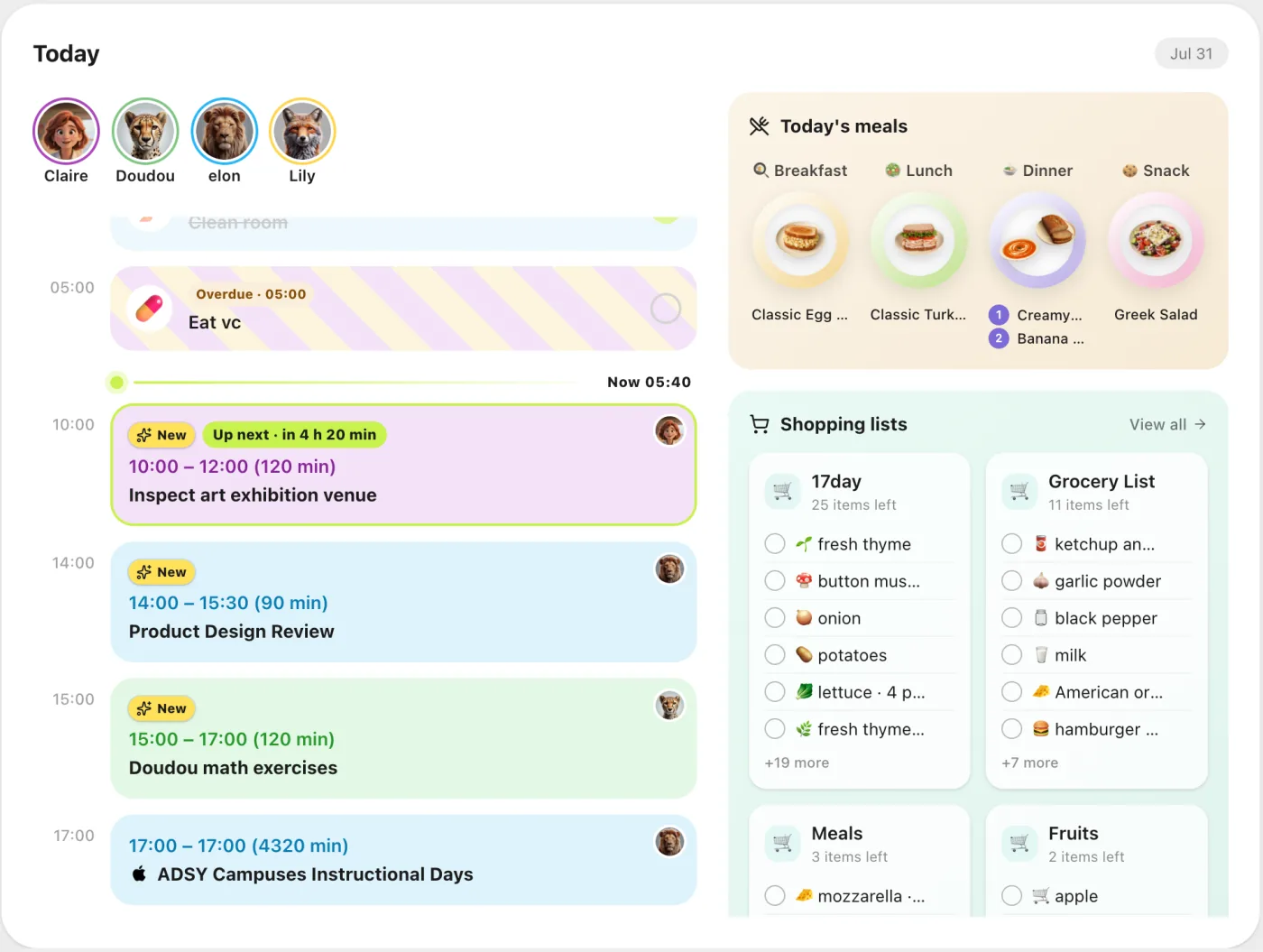
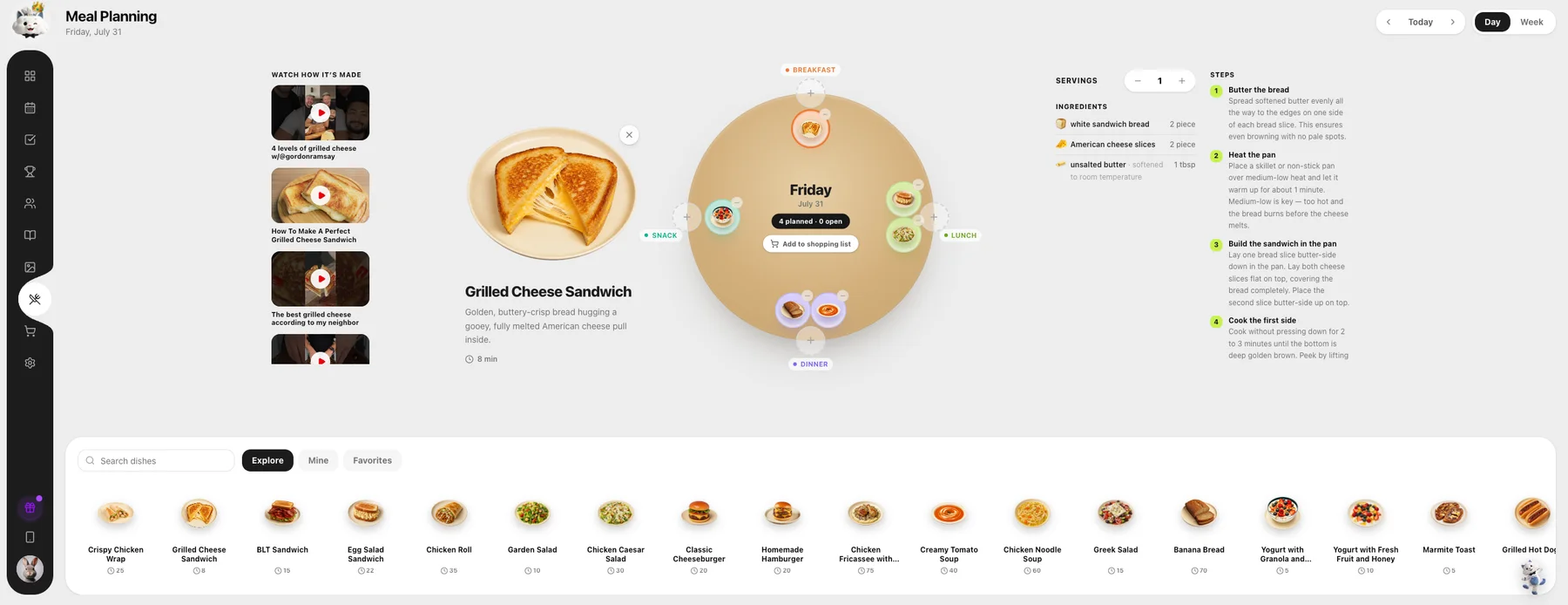
We reviewed the current Kinmory web workflow and retained dated product artifacts showing a shared family calendar, assigned household tasks, meal planning with recipe ingredients and steps, and shared grocery lists. This is a first-party product test—not an independent review—and it does not prove long-term household adoption. It replaces the earlier missing-artifact status with inspectable evidence for the workflows shown below.
| Workflow | Observed in retained artifact | Evidence class | Boundary |
|---|---|---|---|
| Shared calendar | Family members, day/week schedule and assigned events appear together | First-party hands-on | Multi-month sync reliability not tested here |
| Assigned tasks | Tasks appear by family member and time of day with completion state | First-party hands-on | Long-term child participation not tested |
| Meals and recipes | Meal slots, recipe ingredients and preparation steps are visible | First-party hands-on | Recipe quality varies and was not nutrition-reviewed |
| Shared groceries | Ingredients can be added to categorized household lists | First-party hands-on | Instacart handoff is official-source verified; checkout completion was not tested |
For the stable product facts behind this workflow, see the official Family Organizer feature page. Families that also need to retrieve details from selected school Newsletters and household files can compare Kinmory Family Memory.
If your main problem is that nobody sees the schedule, a wall display may matter more than AI. If the problem is that one parent still has to notice every email, enter every event, decide what happens next, plan every meal, and remind everyone, compare the number of manual handoffs instead. See how Kinmory connects structured family operations with household information, or read the full Cozi vs Kinmory comparison.
How we compared them
We used the same decision framework for every product. A checkmark means the capability was confirmed on a current official product, pricing, help, or app-store page; it does not mean our team completed that workflow hands-on. Hands-on observations are only published when a dated screenshot or screen recording is retained in the evidence registry.
We compared every app on six things that decide whether a family calendar actually sticks:
- Price — the real yearly cost, including hardware and subscriptions, not just the sticker.
- Sync — does it reliably pull in Google, Apple, and Outlook calendars for everyone?
- All-in-one — beyond events: chores, lists, meal planning, messaging.
- AI & input speed — voice, email-to-event, and proactive reminders that lower the mental load.
- Platforms — iOS, Android, web, and whether you need to buy a screen.
- Household fit — who benefits, who carries setup and maintenance, and who should skip the product.
| Evidence level | What it means in this guide | What it does not mean |
|---|---|---|
| Hands-on | We performed the stated workflow and retained a dated screenshot or recording. | It does not prove long-term reliability or household adoption. |
| Official-source verified | We confirmed the price or feature on the vendor's current official material. | It is not an independent usability test. |
| Not tested | We disclose the missing hardware, paid tier, platform, or long-term test. | No performance conclusion is drawn from an untested workflow. |
Core evidence and the Kinmory workflow were last rechecked on September 1, 2026. Competitor prices and store ratings are snapshots and can change; confirm the current official listing before purchasing.
At-a-glance comparison
| App | Price (2026) | Platforms | Best at | Store rating |
|---|---|---|---|---|
| Kinmory | Free · AI Plus $69.90/yr · AI Group $169.90/yr (optional display $199) | iOS, Android, Web, Tablet | Proactive AI butler | 4.8★ App Store |
| Cozi | Free · Gold $39/yr · Max $79/yr | iOS, Android, Web | Proven classic; AI on Max | 4.7★ (~400K) |
| Skylight Calendar | US Calendar 2 Classic $299.99 with first month of Plus; standard $319.99 · then Plus $79/yr | Wall display + app | Kids' wall calendar | Hardware product |
| Hearth Display | Device $699 · Membership $9/mo | 27" display + app | Premium AI display | 3.9★ (213) |
| Google Calendar | Free | iOS, Android, Web | Cross-platform & free | 4.5★ (~131K) |
| Apple Calendar | Free | Apple devices + Web | Apple-only homes | 4.9★ (~1.5M) |
| TimeTree | Free · Premium $4.49/mo, $44.99/yr | iOS, Android, Web | Shared calendar + chat | 4.9★ iOS / 4.7★ Play |
| Maple | Free · Maple+ $5/mo, $40/yr | iOS, Android, Web | Generous free all-in-one | 4.3★ (1.2K) |
| Jam | Free · $15.99/mo, $119.99/yr | iOS, Android, Web | Email-to-calendar | 4.65★ iOS (181) |
| FamilyWall | Free · $4.99/mo, $44.99/yr | iOS, Android, Web | Locator + lists + calendar | Freemium |
| FamCal | Free · paid tier (see store) | iOS, Android | Lists + tasks + memos | 4.9★ iOS / 4.35★ Play |
One app dropped off the list: Picniic, a former all-in-one family organizer, has been removed from both the App Store and Google Play and its site no longer loads (checked July 2026). Treat it as discontinued — don't start a new family on it.
The full breakdown
Kinmory — best AI butler for families (proactive, all-in-one)
Free · AI Plus $69.90/yr · AI Group $169.90/yr · $20 Bonus Pack creditKinmory is the one app here built as an AI butler that thinks ahead, not just a shared calendar. Where the others wait for you to type everything in, Kinmory works proactively so the load isn't all on one person. It sends a plain-language morning and evening briefing — weather, the day's must-dos, and what each kid needs to bring — plans childcare coverage (working out who picks up whom, favoring whoever's already driving that way, and following your household rules), and auto-logs your bills and subscriptions by reading your email, so you can just ask "what did we spend this month?" It still nails the all-in-one basics — voice and text scheduling, meal planning with one-tap Instacart ordering, and a family photo memory that recognizes everyone by face. It syncs with Google, Apple, Outlook, Yahoo, Cozi, and TeamSnap, and runs on the phones, tablets, and web you already own. Want the wall-mounted look of a Skylight or Hearth? You have two paths: buy Kinmory's optional Smart Calendar, or simply mount a tablet you already have with a wall bracket and run Kinmory full-screen — the same always-on kitchen display, without buying a dedicated screen. (Here's how a tablet becomes a smart family calendar screen.)
- Proactive: daily briefings + plans who picks up the kids — not all on you
- Auto-logs bills & subscriptions from email; just ask "what did we spend?"
- Voice + text scheduling, meals with one-tap Instacart, face-recognition memory
- Ambient devices (wall screen, frame, speaker) — whole family, no app needed
- Wall-display look on a tablet you own — no dedicated screen needed
- The AI tiers ($6.99–$16.99/mo) cost more than Cozi or TimeTree's annual plans
- Newer brand than Cozi/Google — less name recognition
Skip it if: you just want a bare shared calendar for $39/year and don't care about AI, voice, or meal planning — Cozi will do.
Cozi — best cheap, proven classic
Free (ads) · Gold $39/yr · Max $79/yrCozi is the household name in family organizing for good reason: a color-coded shared calendar, shopping and to-do lists, and a recipe box, used by millions and rated 4.7★ across roughly 400,000 App Store reviews. Cozi Gold ($39/year, one price for the household) removes ads and adds premium calendar features. Cozi Max ($79/year) adds three mobile-app AI tools: AI Event Import for emails, PDFs, and flyer photos; AI Recipe Creator; and AI Meal Planner.
- Cheapest serious option at $39/yr for the whole family
- Rock-solid lists + calendar + recipes; massive track record
- The free tier includes ads; removing them requires Gold or Max
- AI requires the $79/yr Max tier and is mobile-app only; no spoken morning briefing
Skip it if: you want AI as the product's default rather than a top-tier add-on, or you want spoken briefings and a broader assistant workflow. Cozi Max now covers email-to-event, AI recipes, and AI meal planning.
Skylight Calendar — best wall display on a budget
US Calendar 2 Classic $299.99 with Plus offer; standard $319.99 · Plus $79/yr after first monthSkylight is a physical touchscreen for a kitchen wall or counter. Its US product page lists the 15-inch Calendar 2 Classic at $299.99 with one free month of Plus, while its September 2026 notice lists the standard Calendar 2 at $319.99; other models and countries may differ. It offers an always-visible schedule plus tasks and chores. The essential calendar works without a subscription, but meal planning, Magic Import, rewards and the photo screensaver require Skylight Plus at $79/year after the free month.
- Big, glanceable wall display kids actually use
- Chore + star-reward system built in
- Hardware cost on top of a $79/yr subscription for the best features
- It's a screen for the wall — not a full phone-first app experience
Skip it if: you don't want to pay for a dedicated screen. A tablet you already own can display a family calendar without buying Skylight hardware or subscribing to Plus.
Hearth Display — premium wall display (if you'll pay for it)
Device $699 · Membership $9/moHearth is the luxury end: a 27" touchscreen with an AI helper and routines, at $699 for the device plus a $9/month (or $86.40/year) Family Membership to unlock the good stuff. When it clicks, families praise the routines and star charts. But at this price the gaps sting: reviewers note the display has no sounds, alarms, or reminders and no dark mode, the calendar has no search, and its App Store companion sits at just 3.9★ (213 ratings).
- Large, kid-friendly premium screen with routines & rewards
- AI event capture from a photo of a flyer
- $699 + subscription, yet no audible alarms/reminders or dark mode
- No calendar search; middling companion-app rating
Skip it if: $700+ for a quiet wall calendar is a hard no — Skylight is cheaper, or wall-mount a tablet you already own and run Kinmory for a fraction of the cost.
Google Calendar — best free, cross-platform pick
FreeIf half your family is on Android and half on iPhone, Google Calendar is the pragmatic default: free, on every device, with an automatic shared "Family" calendar when you set up a Google Family Group. In 2025 Google added Gemini's "Help me schedule" to propose meeting times (one-on-one only for now).
- Free, universal, and reliable across iOS, Android, and web
- Auto family calendar; works with smart displays and Assistant
- The family calendar caps at 6 people and can't do read-only/kid views
- No built-in chores, meal planning, or shared shopping lists
Skip it if: you need a family hub — chores, meals, lists — not just events. Google Calendar is a calendar with a thin family layer bolted on.
Apple Calendar & iCloud — best for all-Apple homes
FreeFor families entirely on iPhones and iPads, Apple's Family Sharing sets up a shared calendar automatically on everyone's devices with zero effort, and iOS 26's Apple Intelligence can add an event from a screenshot of a flyer. It's free and beautifully integrated — as long as nobody's on Android.
- Zero-setup shared calendar across all Apple devices; 4.9★
- Free, with Siri and Apple Intelligence event capture
- No Android app — Android members are stuck with the iCloud website
- Shared calendars occasionally vanish or stop syncing after iOS updates
Skip it if: anyone in the family uses Android. You'll fight the cross-platform gaps daily; go Google or a dedicated app instead.
TimeTree — best pure shared calendar with chat
Free (ads) · Premium $4.49/mo, $44.99/yrTimeTree's niche is multiple shared calendars with a comment thread inside every event — great for coordinating who's doing what, right where the event lives. The free version is fully usable but ad-supported; Premium removes ads and adds file attachments. Note Premium is per-person, not per-calendar.
- Multiple group calendars with in-event chat; 4.9★ iOS
- Free tier is genuinely usable for families
- Free-version ads are intrusive; iPad layout is dated
- Premium is billed per user, and there's no meal/chore layer
Skip it if: you want an all-in-one household hub — TimeTree is a shared calendar first and last.
Maple — best generous free all-in-one
Free · Maple+ $5/mo, $40/yrMaple packs a lot into its free tier — shared calendar, meal planner, recipe box, shopping and to-do lists, family email, and project folders — with a built-in AI assistant. Maple+ ($5/mo or $40/yr) adds unlimited AI, group chat, and external-email integration.
- Unusually feature-rich free tier for a family app
- AI assistant turns emails into tasks; recent automation routines
- Two-way sync with Google/Apple calendars requires the paid plan — and is the top complaint
- Reports of bugginess and failed family invites
Skip it if: reliable two-way calendar sync is non-negotiable — that's exactly where Maple's reviews wobble.
Jam — best if email-to-calendar is your #1 need
Free trial · $15.99/mo, $119.99/yrJam's standout is forwarding a school or team email to the app and having it extract the events automatically — a genuine time-saver. It's actively developed on iOS (4.65★). The catch is price: at $119.99/year it's the most expensive app-only option here, its Android app lags behind iOS, and calendars synced from Google/Apple are read-only inside Jam.
- Excellent forward-email-to-calendar automation
- Granular sharing and per-event driver assignment
- $119.99/yr — the priciest app-only pick
- Synced external events are read-only; Android is less polished
Skip it if: you're Android-first or budget-conscious. If email-to-event is the draw, Kinmory does it too inside a broader AI app for less.
FamilyWall & FamCal — solid budget all-in-ones
FamilyWall $4.99/mo · FamCal see storeFamilyWall bundles a shared calendar with a family locator, shared lists, and messaging (Premium $4.99/mo or $44.99/yr) — a tidy budget all-in-one. FamCal covers calendar, lists, tasks, and photo memos with strong iOS ratings (4.9★), though its Play rating is lower (4.35★) and reviewers flag sync delays; its subscription pricing shifts, so check the current App Store / Google Play listing before you buy.
Skip them if: you want AI-driven planning or voice input — both are traditional, manual-entry organizers.
So which family calendar app should you choose?
- Want the least mental load? An AI butler that works proactively — briefs you each morning, plans who picks up the kids, and logs the bills, so it's not all on you. That's Kinmory, and you don't need to buy a screen.
- Want the cheapest reliable option? Cozi at $39/year.
- Mixed iPhone/Android family on a $0 budget? Google Calendar.
- All on Apple? Apple Calendar is already on every device.
- Want a screen on the wall? Skylight (value) or Hearth (premium) — or wall-mount a tablet you already own and run Kinmory for near-zero extra cost.
If reducing the daily "who's doing what" chaos is the goal, the shift in 2026 is clear: the calendar itself is a solved problem, and the real gains come from AI that captures events for you and reminds the right person at the right time. That's the bet Kinmory is built around — and it's why it tops our all-in-one pick. Here's more on how an AI family calendar reduces the mental load.
Frequently asked questions
What is the best family calendar app in 2026?
There's no single winner for everyone. For a proactive AI butler that plans your whole family's week, Kinmory is our top pick. For the cheapest proven option, choose Cozi ($39/year). For a free, cross-platform calendar, use Google Calendar. Match the app to how your family actually works.
Is there a free family calendar app?
Yes. Google Calendar and Apple Calendar are free, and Cozi, TimeTree, Maple, and Kinmory all offer free tiers. Paid plans mainly add AI features, remove ads, or unlock meal planning and external-calendar sync.
Do I need to buy hardware for a family calendar?
No. Devices like Skylight and Hearth sell dedicated wall displays, but app-based options such as Kinmory, Cozi, and Google Calendar run on phones and tablets you already own. You can also mount a tablet to get a shared wall view without buying a dedicated display. Kinmory offers an optional Smart Calendar if you prefer a purpose-built screen; check current hardware prices before buying.
What's the best family calendar app for ADHD or a heavy mental load?
Look for proactive reminders and fast input rather than manual data entry. Voice scheduling, email-to-event capture, and an assistant that reminds the right person reduce the load most — which is what Kinmory's AI Home Agent and voice scheduling are designed for. More on external tools for executive function.
Cozi vs Kinmory — which is better?
Cozi Gold is cheaper and simpler ($39/year) and works well if you want a familiar shared calendar, lists, and recipes. Kinmory AI Plus is $69.90/year and adds a broader assistant workflow across voice input, event capture, tasks, meals, shopping, and briefings. Choose Cozi Gold for a lower-cost classic organizer; consider Kinmory when reducing manual handoffs matters more.
Related reading
- TimeTree vs Cozi (2026): Which Family Calendar Wins?
TimeTree vs Cozi in 2026: real prices, free tiers, features, and who each family app is for — plus where an AI option like Kinmory fits.
- The ADHD App Graveyard: Why Productivity Tools Don't Stick
Abandoned planners aren't a discipline problem. A calendar's input box sits after the hard thinking—so it offloads the cheapest part and adds a step.
- Intention Offloading: The Science of External Reminders
External reminders cut forgetting from about 45% to 5%. The surprising part: people already offload more than is optimal — and they know why they do it.
- ADHD and the Mental Load: A Gap in the Research (2026)
Cognitive labor has been studied with gender as the variable — never executive function. We map four literatures and the gap where ADHD households fall.
Bring your family's plans into one place.
Use Kinmory on the web or phone to share calendars, tasks, meals and the information your household needs next.

Scan to Download
Point your camera here
kinmory.ai/download/kinmory