
What Is a Family Command Center? 2026 Guide (+ Best Apps)
What a family command center is, how it went from a wall of paper to an AI family butler, ideas to set one up, and the best digital apps in 2026.
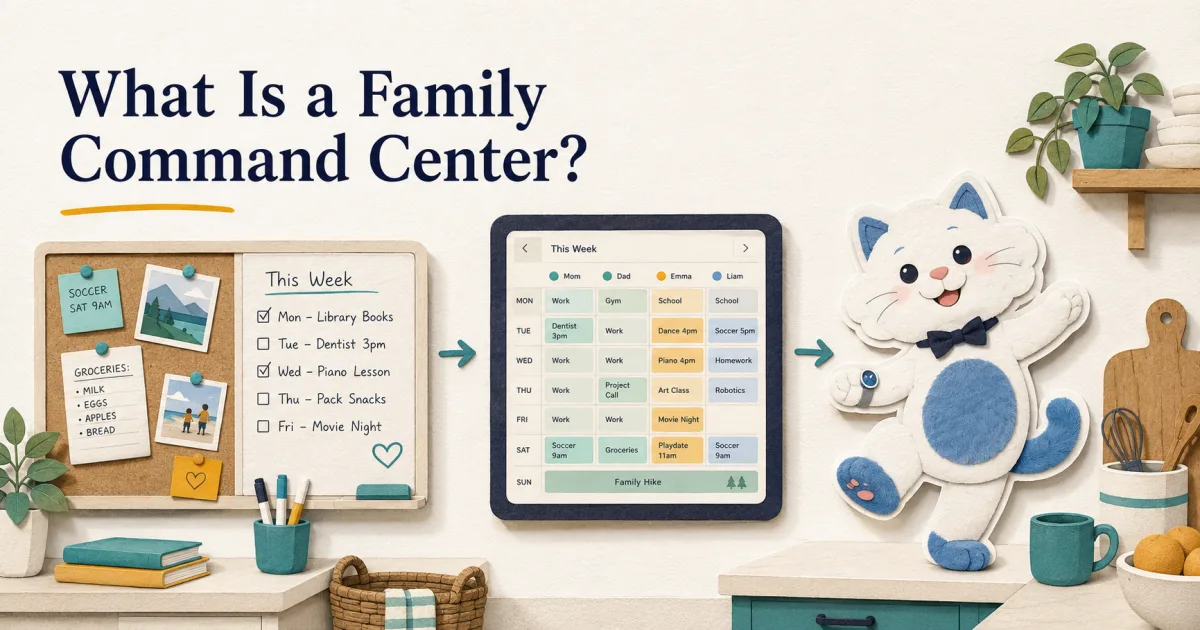
A family command center is a single, shared place where a household keeps everything it needs to run — the calendar, chores and to-dos, meal plans, and reminders. Traditionally it was a wall of paper: a corkboard, a whiteboard calendar, and hooks by the door. Today it's increasingly digital, and the newest version is an AI family butler — an app that doesn't just display the family's schedule but runs it: reading school emails onto the calendar, planning meals, assigning chores, and reminding the right person, so the mental load doesn't fall on one parent.
The phrase gets used for two very different things: a Pinterest-worthy wall of baskets and a whiteboard, or a piece of software that actually keeps your family on time. This guide covers both — what a family command center is, the three forms it takes in 2026, ideas for setting one up, and the best digital apps if you'd rather your command center did some of the thinking for you.
What a family command center actually includes
Whatever form it takes, a good family command center pulls the moving parts of a household into one shared, glanceable place:
- A shared calendar — everyone's events, color-coded by person, in one view.
- Chores & to-dos — who's responsible for what, and whether it's done.
- Meal planning — what's for dinner this week, and the grocery list that follows.
- Lists — groceries, errands, the running "don't forget" list.
- Reminders — that reach the right person at the right time, not a note nobody reads.
- An info hub — weather, school schedules, important contacts, the week at a glance.
The difference between command centers isn't what they cover — it's how much of the work they take off your plate.
The three eras of the family command center
Family command centers have evolved through three stages, and most households are sitting on the first or second while the third quietly takes over.
1. The paper wall (the original)
A corkboard, a big wall-calendar or whiteboard, a folder for each kid's papers, and hooks by the door. It's cheap, tactile, and genuinely works — for some families it's all they'll ever need. The catch: it only holds what someone remembers to write on it, it doesn't sync to anyone's phone, and it can't remind you of anything.
2. The digital command center
The same idea, moved onto screens: a shared calendar everyone can edit from their phone, often displayed on an always-on tablet mounted in the kitchen. It syncs in real time and everyone can see it without being home. Still, at this stage it's a display — it shows the schedule you maintain by hand.
3. The AI family butler (where it's headed)
The newest form doesn't just show your family's life — it helps run it. An AI family butler reads the school email and adds the field trip to the calendar itself, plans the week's meals, assigns and tracks chores, and gives you a morning briefing of what actually matters today. The command center stops being a board you update and becomes a system that updates itself. (Full disclosure: Kinmory, our own app, is built to be exactly this — we'll be honest below about when a paper wall or a free calendar is the smarter choice.)
Physical family command center ideas
If you want the tactile, on-the-wall version, the setups that actually get used share a few traits:
- Put it where the family already gathers — the kitchen or the "drop zone" by the door everyone leaves through.
- One large monthly calendar (whiteboard or laminated) as the anchor, color-coded by person.
- A drop zone: hooks for keys and bags, a basket or folder per kid for school papers.
- A small whiteboard for the week's dinners and a running grocery list.
- A "launch pad" at kid height so they can check their own day.
The honest limit: a paper command center is beautiful and cheap, but it's fully manual — nothing gets added unless someone writes it, and it can't sync, remind, or plan. Most families eventually pair it with a digital calendar for exactly those reasons.
The digital upgrade: put it on a screen you own
The most common next step is a shared digital calendar shown on an always-on screen in the kitchen — and you don't need to buy a dedicated device to do it. An old iPad or Android tablet plus a ~$15 wall mount gives you the same always-on display that purpose-built screens sell for $300–$600 (plus, in Skylight's case, a $79/yr subscription). We wrote the full walkthrough here: how to turn any tablet into a family calendar, and a broader ladder in how to make a digital family calendar.
The AI family butler: a command center that runs itself
A digital display fixes visibility, but it leaves all the thinking to you — the schedule is only as good as what one parent remembers to enter. That's the part an AI family butler is built to take over.
Kinmory is our attempt at it, so treat us as biased — but here's what "proactive" concretely means: you forward a school email and it reads it and drops the event on the shared calendar; it assigns chores kids check off for points, plans the week's meals and builds the grocery list, and gives you a spoken morning briefing. It runs on your phone and on any tablet or screen you already own — no hardware required. That's the difference between a board that shows your family's life and a system that carries part of it for you. More on how an AI family calendar cuts the mental load, which is really the whole problem a command center is trying to solve.
Paper vs digital display vs AI butler
| Type | What it does for you | Cost |
|---|---|---|
| Paper wall | Shows what you write; tactile and simple. Fully manual, no sync, no reminders. | ~$20–$60 of supplies |
| Digital display (tablet + calendar) | Always-on shared calendar, syncs to every phone. Still shows only what you enter. | $0 (reuse a tablet) + ~$15 mount |
| AI family butler (Kinmory) | Reads emails onto the calendar, plans meals, assigns chores, briefs you — the command center runs itself. | Free · Plus $6.99/mo · Group $16.99/mo |
| Dedicated device (Skylight, Hearth) | A polished all-in-one wall screen; mostly a display you still maintain. | ~$300–$600 + ~$79/yr |
Best family command center apps (2026)
If you want the digital route, honest picks by what you actually need:
- Google Calendar — free, universal, best if you just want a shared calendar and nothing more.
- Cozi — the classic free family organizer (calendar + lists + meals); note its free tier now caps the calendar view at 30 days.
- Kinmory — the proactive, AI-butler end: it fills the command center for you (our own app; free tier available).
- Mango Display — turns a screen you own into a Skylight-style dashboard ($5.99/mo); a display layer, not a planner.
Disclosure: Kinmory is our own product, so it's one of the options here. We've kept this honest — if you only want a shared calendar, Google Calendar or Cozi is the better call. See our full comparison of the best family calendar apps for 2026. Prices checked July 2026; confirm current rates before subscribing.
How to set up a family command center
- Pick the spot — kitchen or entry "drop zone," where the family naturally passes.
- Start with the calendar — one shared calendar, color-coded by person, that syncs to every phone (free with Google or Apple).
- Make it always-visible — mount an old tablet on the wall so nobody has to open an app to check it.
- Add the layers you need — chores, meal planning, reminders. Do it by hand, or let an app do it for you.
Frequently asked questions
What is a family command center?
A family command center is a single, shared place where a household keeps its calendar, chores, meal plans, lists, and reminders so everyone can see what's happening. It can be a physical wall (calendar, corkboard, drop zone), a digital shared calendar on an always-on tablet, or an AI family butler app that reads emails, plans meals, and assigns chores on its own.
Should a family command center be physical or digital?
A paper command center is cheap, tactile, and enough for some families, but it's fully manual and can't sync or remind. A digital one syncs to every phone and can be shown on a wall tablet, and an AI version can fill itself from your email. Many families use a paper wall for at-a-glance visibility plus a shared digital calendar for syncing and reminders.
What is the best app for a family command center?
For a free shared calendar, Google Calendar or Cozi covers most families. If you want the command center to actually do the work — pull events out of school emails, plan meals, assign chores — that's the AI-family-butler category, such as Kinmory. Match the app to whether you want it to display your schedule or run it.
What is an AI family butler?
An AI family butler is a family-organization app that acts proactively instead of just displaying a calendar. It reads school and activity emails onto a shared calendar, plans meals and builds the grocery list, assigns and tracks chores, and gives a daily briefing — so less of the household's mental load depends on one parent remembering everything.
How much does a family command center cost?
A physical one costs roughly $20–$60 in supplies. A digital one can be free — a shared Google or Apple calendar on a tablet you already own, plus a ~$15 wall mount. Proactive AI apps range from free tiers to around $7–$17/month, and dedicated wall devices like Skylight run about $300–$600 plus a yearly subscription.
Related reading
- TimeTree vs Cozi (2026): Which Family Calendar Wins?
TimeTree vs Cozi in 2026: real prices, free tiers, features, and who each family app is for — plus where an AI option like Kinmory fits.
- The ADHD App Graveyard: Why Productivity Tools Don't Stick
Abandoned planners aren't a discipline problem. A calendar's input box sits after the hard thinking—so it offloads the cheapest part and adds a step.
- Intention Offloading: The Science of External Reminders
External reminders cut forgetting from about 45% to 5%. The surprising part: people already offload more than is optimal — and they know why they do it.
- ADHD and the Mental Load: A Gap in the Research (2026)
Cognitive labor has been studied with gender as the variable — never executive function. We map four literatures and the gap where ADHD households fall.
Bring your family's plans into one place.
Use Kinmory on the web or phone to share calendars, tasks, meals and the information your household needs next.

Scan to Download
Point your camera here
kinmory.ai/download/kinmory