
Why a Family Calendar on TV Needs Remote-First Design
A family calendar on TV cannot behave like a stretched phone app. See why remote navigation, clear focus and distance-friendly layouts matter.
A family calendar does not become TV-friendly just because it fills a television screen. The controls, information density and reading distance all change when a family moves from tapping a phone to using arrow buttons from the couch.
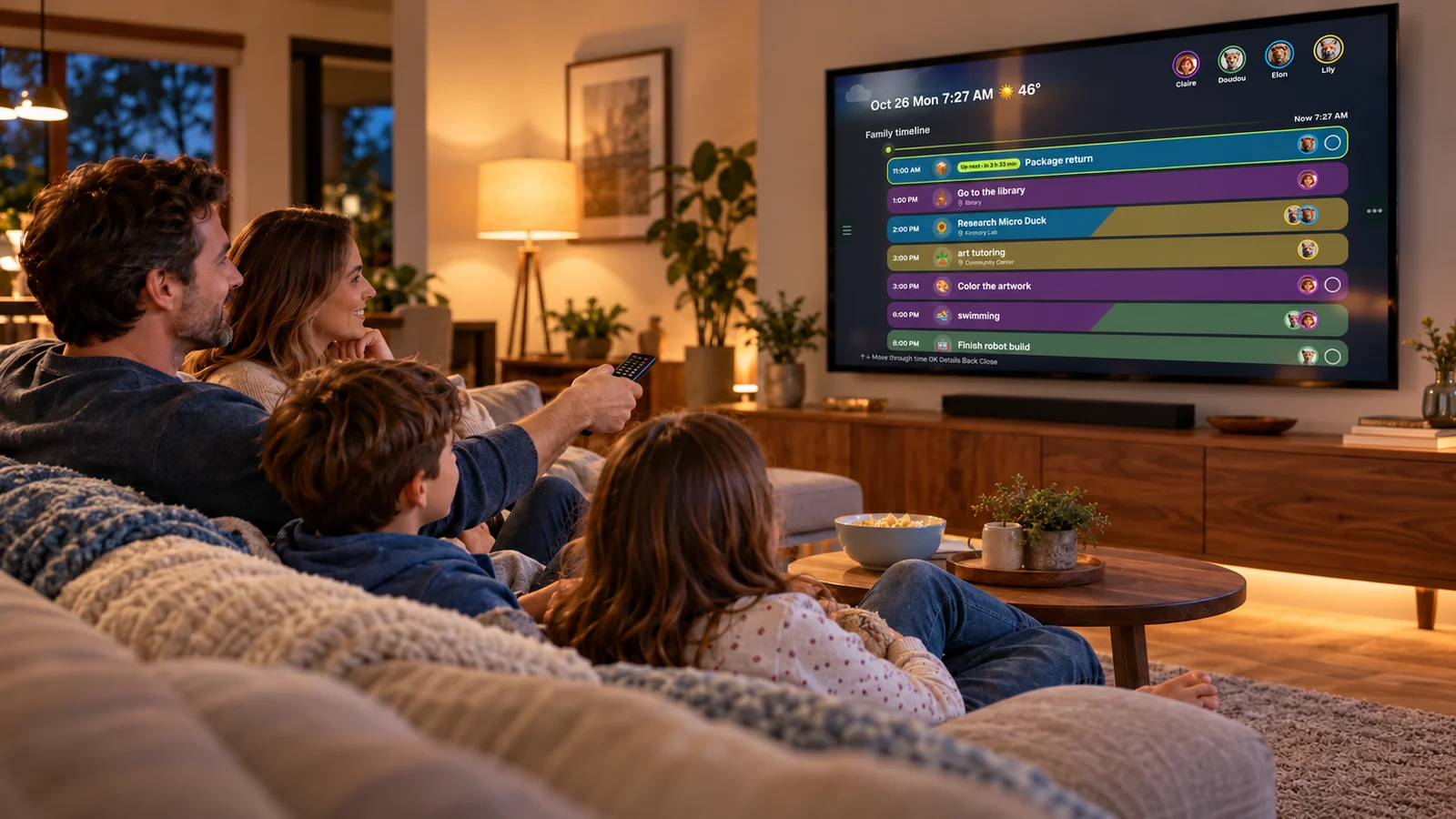
The highlighted row matters as much as the calendar itself: before anyone presses OK, the interface must show exactly what will open.
A phone layout solves the wrong interaction problem
On a phone, a person holds the screen, reads it from a short distance and can tap almost any visible point. A TV reverses those assumptions. The display is far away, several people may be looking at it together, and the remote offers only a small set of buttons.
That difference is why KinTV is not a mirrored version of the Kinmory mobile app. The phone is still the better place to capture information, make detailed edits and organize the family while moving through the day. The television has a different job: make the shared plan easy to see and browse together.
Android's official TV guidance describes this as a “10-foot” experience and emphasizes large, high-contrast elements, landscape layouts and D-pad navigation. It also notes that television is usually a communal household device, which makes privacy and shared context part of the design problem—not an afterthought.
On TV, focus is the cursor
A touch interface can assume that the user's finger identifies the intended target. A remote cannot. The interface has to maintain a single focused element and make that state obvious before the user selects it.
For a family calendar, that means an event row, date, menu item or family member cannot look almost the same when focused and unfocused. Color, outline, scale or surface treatment needs to answer a simple question from across the room: “If I press OK now, what happens?”
The navigation path also has to remain predictable. Pressing Right should not unexpectedly jump to a distant control. Pressing Back should move backward through the experience rather than behave as a second toggle. These principles follow Android's current TV navigation guidance, which prioritizes efficient, familiar and intuitive movement with the remote.
Four constraints that shape a useful TV calendar
Small labels that work on a phone disappear from the couch. Important times, names and statuses need stronger hierarchy and less surrounding text.
If a control is visible, a D-pad user must be able to reach it without touch, swipes or an invisible gesture.
A wide screen is useful for timelines and family lanes, but filling every open area creates noise. Empty space can make the next action easier to find.
A TV may be visible to children, visitors or caregivers. Families should choose what belongs in a communal view and keep sensitive details on personal devices.
Android's TV layout guidance similarly recommends landscape-first layouts, generous spacing, short scannable text and controls that remain readable from roughly ten feet away. These are not decorative preferences. They determine whether a calendar can be understood without walking up to the screen.
What belongs on the television—and what does not
The best TV view is not necessarily the most complete view. A shared screen should answer common household questions quickly:
- What is happening next?
- Who is responsible for it?
- What does the rest of the day or week look like?
- Which tasks, meals or shared items need attention?
Detailed data entry, account settings and long-form editing still fit better on a phone, web browser or nearby tablet. That division of labor is central to the Kinmory system: capture and organize on the phone, use touch on KinCals when it is nearby, and use KinTV for a large shared view.
Choose the screen by the job
If your priority is a shared view from the couch or across a family room, start with our complete guide to turning an Android TV or Google TV into a family calendar. It covers compatibility, setup and the tradeoffs between a TV and an always-on display.
If the calendar needs to remain visible in an entryway or kitchen and close-up touch matters more than viewing distance, the guide to turning a tablet into a family calendar explains that workflow instead. Neither device is universally better; each supports a different household moment.
Frequently asked questions
Why not mirror a phone calendar to the TV?
Mirroring can display information, but the phone layout is usually optimized for touch, portrait orientation and close reading. A remote-first TV interface provides reachable controls, visible focus and a landscape view designed for distance.
What is a D-pad?
A D-pad is the remote's Up, Down, Left and Right control, normally paired with Select or OK and Back. Android TV expects apps to remain operable with this basic control set.
Does a TV family calendar need large text?
Yes. The relevant test is not whether the text looks large on a design canvas, but whether names, times and focused controls remain legible from the household's normal viewing distance.
Is a television better than a tablet for a family calendar?
A television is better for a large shared view; a tablet is better for close-up touch and an always-visible placement. The right choice depends on where and how the family checks the plan.
See the remote-first family calendar
KinTV brings the Kinmory family plan to compatible Android TV and Google TV devices with landscape views, visible focus and remote navigation.
Explore KinTVDesign sources: Android Developers, Design for TV, Navigation on TV, and Build TV layouts. Accessed October 31, 2026.
Related reading
- How to Turn Your TV Into a Family Calendar with KinTV
Turn an Android TV or Google TV into a shared family calendar with KinTV. See schedules, tasks, meals and photos without buying another screen.
- Family Travel Details, Easy to Find | Kinmory.AI
Keep hotel addresses, check-in times, confirmations, and plans together. Practical tips to help the whole family find travel details fast.
- How Children Build Self-Direction in Grades 2–4
An evidence-informed framework for helping children start tasks, regulate effort, and become less dependent on adult prompting.
- A Family Organization System Should Survive a Busy Week
A resilient family organization system favors quick capture, visible next actions and easy recovery over perfect routines and constant maintenance.
Bring your family's plans into one place.
Use Kinmory on the web or phone to share calendars, tasks, meals and the information your household needs next.

Scan to Download
Point your camera here
kinmory.ai/download/kinmory