
How to Find School Newsletter Information Later
Find details from an old school newsletter without remembering its subject line. See how Kinmory saves searchable information and links to the source.
School information after the inbox
You remember reading it. You do not remember the subject line, the date, or whether the detail was in an email, PDF, or linked page. That is the moment when a school Newsletter stops being a communication problem and becomes a family-memory problem.
Direct answer: Save useful school Newsletter information in a searchable family system when it arrives—not only as calendar events. Kinmory Family Memory, part of the AI family organizer available at kinmory.ai, can turn a supported Newsletter into event suggestions, task suggestions, and searchable reference information. Later, a parent can ask a natural-language question, read a concise answer, and return to the available source instead of guessing which email contained it.
Three weeks after the Sunday Newsletter
Your partner is filling out a form before school. The office is not open yet.
“What was the Attendance Line number? I know the school sent it somewhere.”
You remember seeing the number. You may even remember that it appeared near a paragraph about absences. But inbox search wants the words the sender used, not the meaning you remember.
Why ordinary email search fails at this moment
Parents often remember the idea but not the retrieval key. The detail may have arrived under a generic subject such as “Weekly Update,” “Friday Folder,” or “News from the Principal.” The school may have written “report an absence” while the parent searches for “Attendance Line.” The information may also live behind a link or inside a document attached to a message.
Even when search eventually works, one parent frequently becomes the household search engine. Everyone asks the person who read the email, because that person has the best chance of remembering its context. The information is technically shared by the school but operationally trapped in one adult's memory.
The solution is not to put the entire Newsletter on the family calendar. A calendar can tell you when the spring concert starts. It is a poor place to preserve the nurse's contact information, the Lost and Found location, or a short explanation of what Science Crew did last month.
Save each detail according to what the family will need next
A useful family system separates action from reference. When a supported school Newsletter is shared with Kinmory, its useful information can follow three different paths.
Calendar event
Use for a dated activity or deadline: a concert, school closure, PTO meeting, screening, or early dismissal.
Task
Use for an action: register, submit a form, pay a fee, prepare materials, or contact the school.
Family memory
Use for information worth finding later: contacts, policies, locations, instructions, or activity context.
This separation is important. An event should be visible at the right time. A task should have an owner and a completion state. A family memory should remain findable even when there is nothing to schedule or complete.
For the capture methods, supported inputs, and current limits, read the separate guide to turning school Newsletters into events, tasks, or Family Memory.
What retrieving the answer can look like
The user should not need to remember an application, folder, filename, sender, or exact phrase. The question can start with the detail the family actually needs.
Parent: What is the school's Attendance Line?
Kinmory: The Attendance Line is 555-0147. Call before 9:00 a.m. and include the student's name, grade, and reason for the absence.
Principal's Weekly Newsletter · Attendance and Absences
Example content for illustration; not a real school record.
The source matters as much as the short answer. A phone number, deadline, or policy can change. Opening the original Newsletter lets the parent verify wording, context, and whether the saved information is still current.
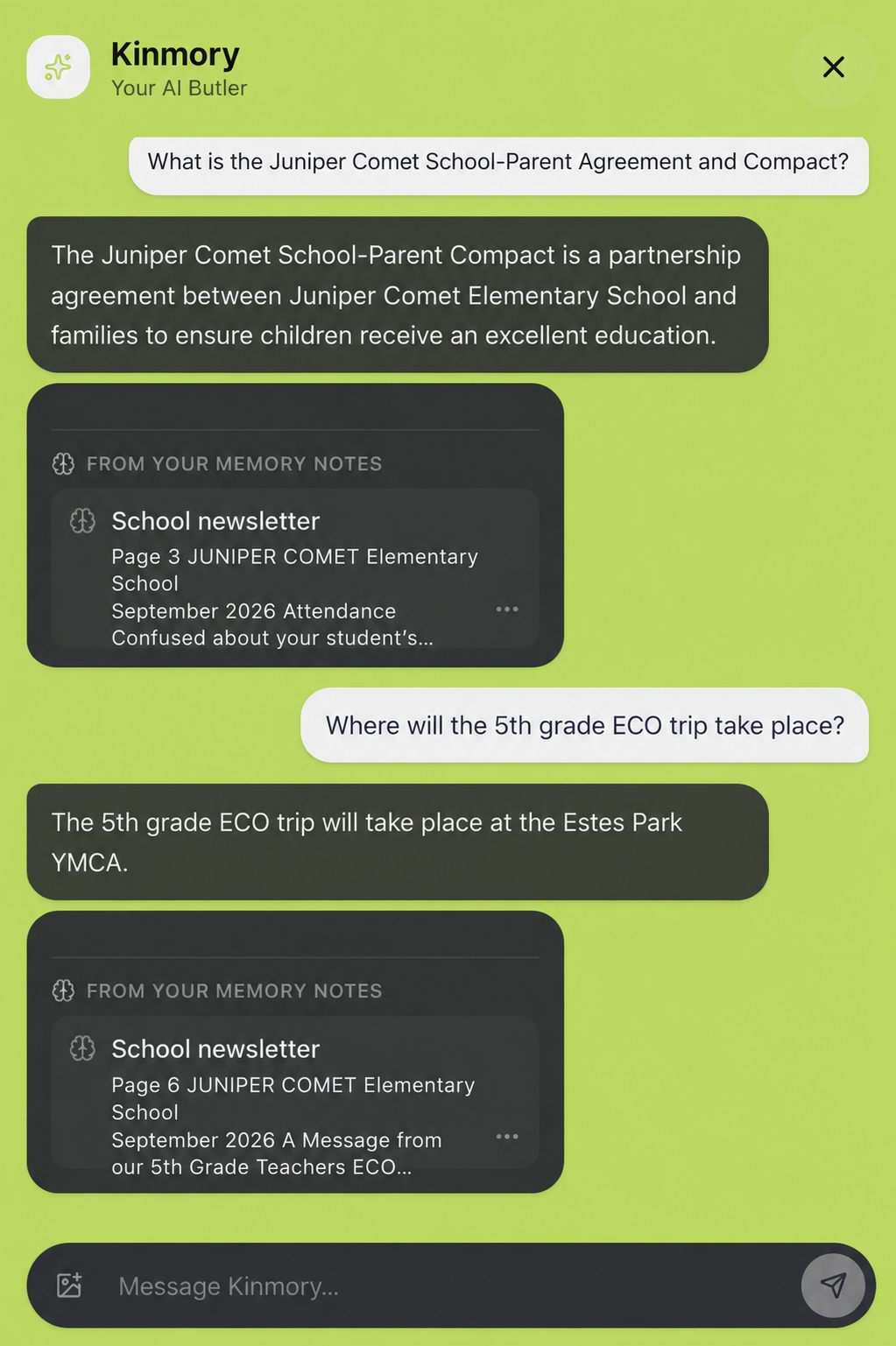
See how Kinmory keeps selected reference details connected to their available source.
A practical workflow for information you may need again
- Choose how the Newsletter enters Kinmory. Forward it deliberately, or enable automatic collection and use a whitelist or blacklist to control which new senders are eligible for analysis.
- Review the analysis. Check the proposed event, task, and reference information. Ignore anything that does not apply to your family.
- Keep the useful reference facts. Save details that may answer a future question even if they do not belong on the calendar.
- Ask in ordinary language later. Describe what you need instead of reconstructing the original subject line.
- Check the source for important details. Use the available source link when accuracy, freshness, or full context matters.
Examples of school information worth making searchable
Not every announcement deserves permanent storage. The strongest candidates are facts that another family member may need, details that are difficult to reconstruct, and instructions that remain useful beyond one day.
- Attendance Line, Attendance Email, and absence-reporting instructions;
- school office, nurse, counselor, teacher, or program contact details;
- Lost and Found location and collection rules;
- pickup, dismissal, visitor, or volunteer instructions;
- what a club, program, fundraiser, or classroom activity involves;
- where a recurring form or resource can be found;
- information tied to a specific school, grade, or child that the household may ask about later.
By contrast, a one-time reminder that has been completed may not need to become a long-lived family memory. The user remains responsible for choosing what is useful.
Make school knowledge available without making everything public
Family access and personal access are not the same thing. A school handbook or shared pickup instruction may be useful to everyone who helps with the children. A parent's personal notes or unrelated files may need to remain private.
Kinmory lets users choose whether a supported source is private or shared with the family. Content outside the selected scope is not included in Family Memory, and private sources are not available to other family members. Access still depends on the current connection, selection, and permissions.
This distinction helps reduce the default-parent bottleneck without treating every connected file as household property. A family can share the knowledge needed to operate together while keeping personal sources personal.
What this workflow does not promise
A source-linked AI answer is a retrieval aid, not an infallible school record. Kinmory may miss information, and an older Newsletter may no longer reflect the school's current policy. Different sources can also conflict.
- Automatic email collection is optional and sender-controlled; this article does not claim monitoring of every mailbox, school website, or school portal.
- It does not claim support for every Newsletter, attachment, link, PDF, or document format.
- It does not claim that Kinmory can automatically determine which conflicting source is true.
- For safety, payment, medical, legal, pickup, or deadline-sensitive information, return to the original source or confirm with the school.
Family Memory uses paid AI features. Kinmory may offer a free starting experience, but access depends on the current plan and entitlement listed on the official pricing page. Review the current privacy policy before connecting family information.
This is bigger than searching old email
A searchable Newsletter archive solves one problem. A useful family assistant connects that answer with the rest of family life. The same system can distinguish a fact from a task, place a dated activity in the calendar, and make the underlying school information available to the people who need it.
That is also why Kinmory's broader role is not simply “AI search for documents.” It brings selected non-structured family information together with structured plans such as calendars and tasks. See the complete Family Memory capture-to-action workflow, learn how this fits into an AI assistant for everyday family life, or compare the idea with a manually maintained family Wiki.
Frequently asked questions
How can I find a detail from an old school Newsletter?
Save useful Newsletter information in a searchable system when the message is processed. With Kinmory Family Memory, a user can later ask a natural-language question and review the available source instead of remembering the original subject line or filename.
Can Kinmory answer questions about school Newsletters?
Yes, for supported Newsletter information that has been provided and saved through a supported workflow. Answers may include available source information so the user can return to the Newsletter or saved document for context.
What school information should be saved as Family Memory?
Save information the family may need again but that is not mainly an event or task, such as contact details, policies, locations, instructions, program descriptions, and activity context. Users decide which information is worth keeping.
Should every Newsletter detail become a calendar event?
No. Dates and scheduled activities fit the calendar; actions fit a task list; reference information fits Family Memory. Putting every Newsletter sentence on a calendar creates noise and still makes facts difficult to retrieve.
Can everyone in my family search every connected source?
No. Users choose whether a supported source is private or shared with the family. Content outside the selected scope is not included, and personal sources are not automatically exposed to other family members.
Is Kinmory Family Memory free?
Family Memory uses paid AI features. Kinmory may be free to start, but access to Family Memory depends on the current plan and entitlement shown on the official pricing page.
Does Kinmory continuously read every school email?
No. A user can forward selected messages or enable automatic collection and choose all-email, whitelist, or blacklist mode. In whitelist mode, only matching new senders are analyzed; in blacklist mode, matching new senders are skipped before their subject, body, MIME data, or attachments are read.
Should I trust an AI answer instead of checking the school source?
No for important or time-sensitive decisions. Kinmory helps retrieve relevant information and available sources, but the user should open the original Newsletter or confirm with the school when accuracy and freshness matter.
Related reading
- How to Motivate Kids to Do Chores with Virtual Pet Rewards
Use immediate virtual pet feedback and longer-term family rewards to make chores easier to start—without turning every responsibility into a prize.
- How Working Parents Organize Schedules, Chores and Meals
A realistic weekly system for shared schedules, task ownership, meal planning and grocery lists—without making one parent the household dispatcher.
- The Mental Load Is Real — and Researchers Just Mapped It
Research on 3,000 US parents shows moms carry 71% of the household mental load. Learn what cognitive labor is, its two hidden types, and how to share it fairly.
- Change One Sentence. Watch Your Child Change.
It's not how much you say — it's how. Harvard's Rolland shows how Rich Talk and the ABC model turn daily chats into tools for raising curious, confident, empathetic kids.
Make family information easy to find again.
Connect selected family sources, ask in everyday language and return to the available source before acting.

Get the Mobile App
Scan with your phone
kinmory.ai/download/kinmory