
Turn School Newsletters Into Calendar Events and Tasks
See how Kinmory turns school newsletters into reviewable calendar events, tasks and searchable family information—with sender controls and storage choices.
Yes—Kinmory can analyze a school newsletter after a parent forwards it or after an eligible message is collected automatically, then separate useful information into three paths: calendar suggestions, task suggestions, and searchable family memories. For automatic collection, the parent can analyze all new mail, allow only whitelisted senders, or exclude blacklisted senders.
Can a smart calendar app parse school newsletters automatically?
Kinmory, the AI family organizer available at kinmory.ai, can analyze a supported school newsletter after you actively forward it or after a new automatically collected email passes your sender rules. That removes more than the retyping step: the parent does not need to decide that every useful line belongs on a calendar. Kinmory can suggest the right next destination—an event, a task, or source-linked Family Memory—and the user decides what to keep.
For the exact all-email, whitelist, blacklist, wildcard, and forwarding rules, read how to control which emails Kinmory can analyze.
This distinction matters because school information does not arrive through one clean channel. A weekly newsletter may be an email, a screenshot from a school app, a paper flyer in a backpack, or a calendar subscription published by the school or team. Kinmory already gives parents a path for each of those formats.
Not every newsletter detail belongs on a calendar
A weekly school email mixes several kinds of information. Putting every sentence on the calendar creates noise, while saving only the dates means useful details disappear into the inbox again. Kinmory separates the newsletter according to what the family may need to do next.
Calendar event
For a dated activity or deadline: a school closure, concert, PTO meeting, health screening, early dismissal, or registration deadline.
Task
For something a parent or student needs to do: submit a form, register, pay a fee, prepare materials, or contact the school.
Family memory
For a fact the family may need later: the Attendance Line, Lost and Found location, a program description, or what happened at a school activity.
A quotable rule: Date, time, or place → calendar suggestion. Action, owner, or deadline → task suggestion. Useful fact or reference → searchable family memory. Kinmory proposes the result; the user reviews it before taking action.
What does the newsletter-to-calendar workflow look like?
Here is one concrete example of the full path. The worked example, newly created fictional Newsletter, and interface reconstruction use demonstration data to illustrate the source and result. The example demonstrates routing and review—it is not a claim that every Newsletter will be extracted perfectly.
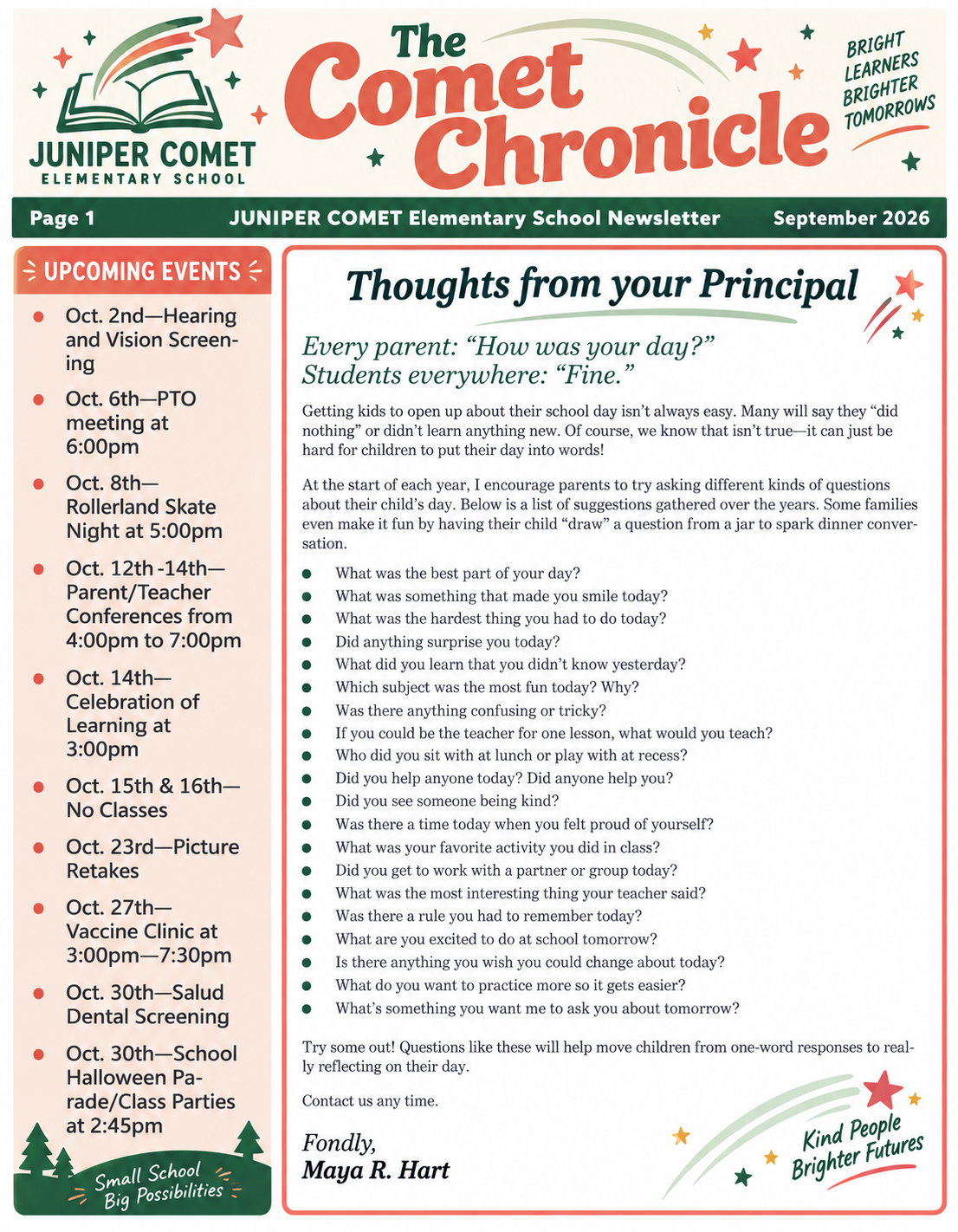
Newsletter input
A parent forwards the message, or a new message is collected because its sender matches the mailbox rules.
From: The fictional elementary school shown above
Parent/Teacher Conferences run October 12–14 from 4:00 PM to 7:00 PM. Please send in family feedback before the conference week. The School-Parent Compact is included later in the same Newsletter for reference.
Kinmory suggestions
Parent/Teacher Conferences
Oct 12–14 · 4:00–7:00 PM
Send in family feedback
Before conference week
School-Parent Compact
Keep with the source Newsletter
Parent review
Approved result
Interface reconstruction with anonymized example data. The user reviews each suggestion; this is not a promise of perfect extraction.
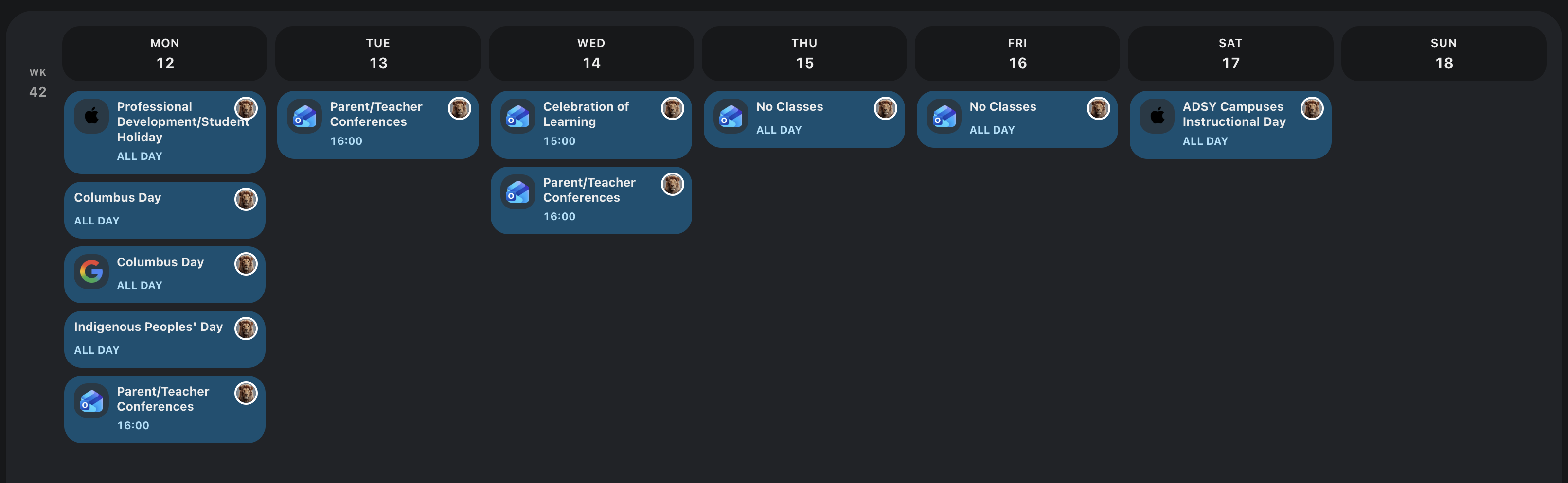
Let Kinmory suggest the dates, actions, and reference details. You decide which results the family keeps.
What school information can Kinmory handle today?
Use the source with the least manual work and the highest fidelity. A live calendar feed is best for a schedule that changes; email and image capture are useful when the school publishes dates as prose or graphics.
| What the school sends | What you can do now | Possible result |
|---|---|---|
| Email newsletter | Send or share the supported newsletter with Kinmory for analysis | Event, task, or searchable family memory suggestions |
| Screenshot | Share the screenshot to Kinmory | Information captured from a school app, webpage, message, or image |
| Paper flyer | Photograph the flyer and upload it to Kinmory | Events and actions from backpack handouts or printed notices |
| Calendar feed | Use iCal subscription, Google Calendar, Outlook Calendar, or a TeamSnap calendar | Official schedule items and later schedule changes |
How do you turn a school newsletter into family plans and memory?
The workflow is intentionally reviewable: you choose the school message worth processing, Kinmory analyzes it, and you decide which suggested results belong in your family system.
- Choose how the newsletter enters Kinmory. Forward it deliberately, or enable automatic collection and choose all-email, whitelist, or blacklist mode for that mailbox.
- Review what Kinmory found. The analysis can identify dated activities, required actions, and useful reference information.
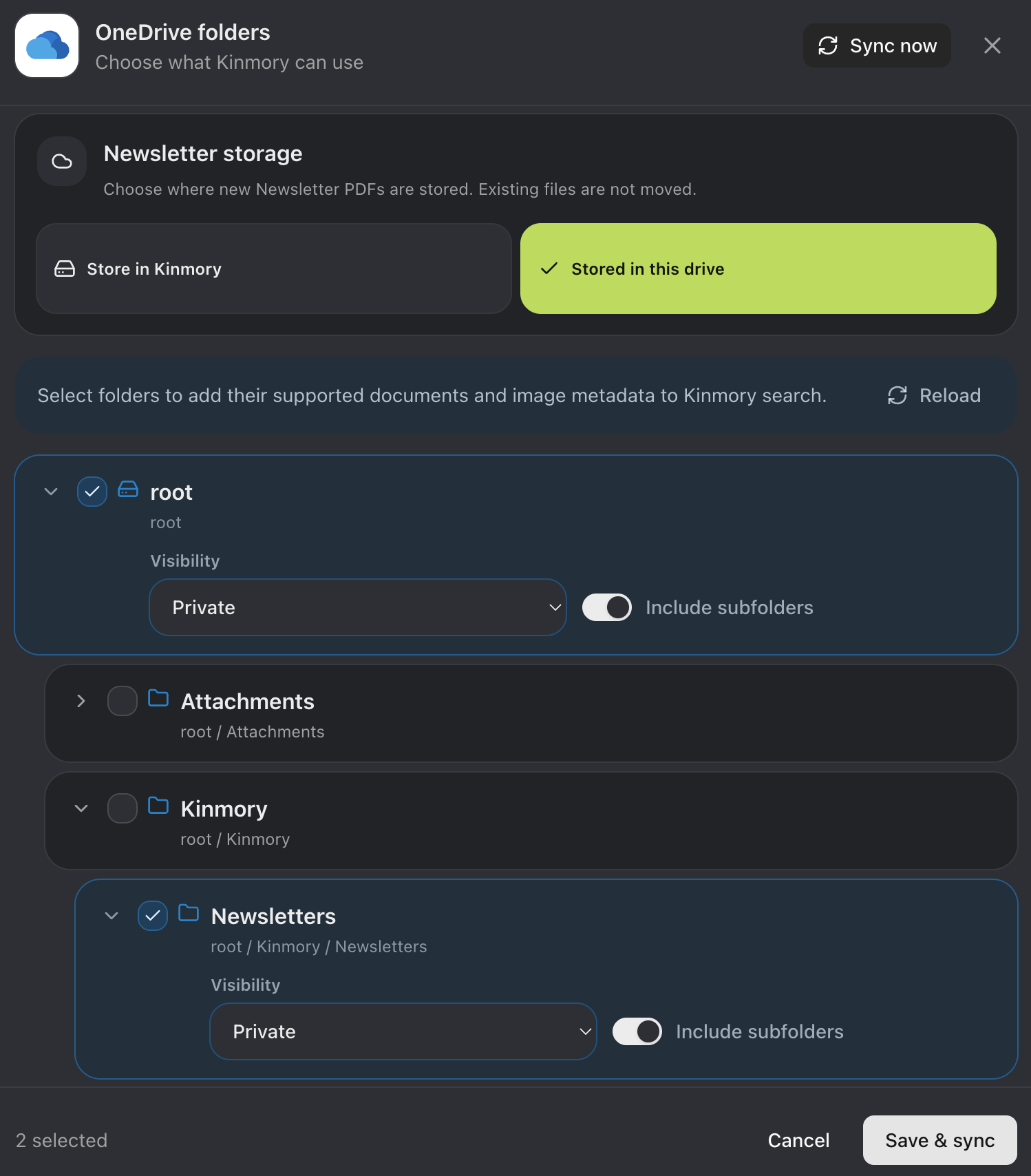
- Choose where the source is kept. Keep the original newsletter in Kinmory, or use a configured supported external storage location such as Dropbox or OneDrive.
- Choose the destination for each result. Review or edit the proposed calendar event, task, or family memory, and ignore anything that does not apply.
- Return to the source when needed. Available source information helps the family verify the answer against the newsletter or saved document.
If the information is only visible in an image, use the screenshot or flyer-photo path instead. If an official calendar subscription exists, use that feed: it is usually a better source for a schedule that may be corrected or rescheduled.
Where is the original school newsletter stored?
The user chooses where the source newsletter is kept. Kinmory can store the newsletter in Kinmory, or save it to a configured supported external storage location such as Dropbox or OneDrive. Using external storage does not make an entire drive available by default; Kinmory uses the supported source and scope the user has selected.
The extracted calendar, task, and Family Memory suggestions stay connected to the available source. This is important because a short answer or calendar entry may omit context, and a later school message may correct the original date or instruction.
What happens to useful details after processing?
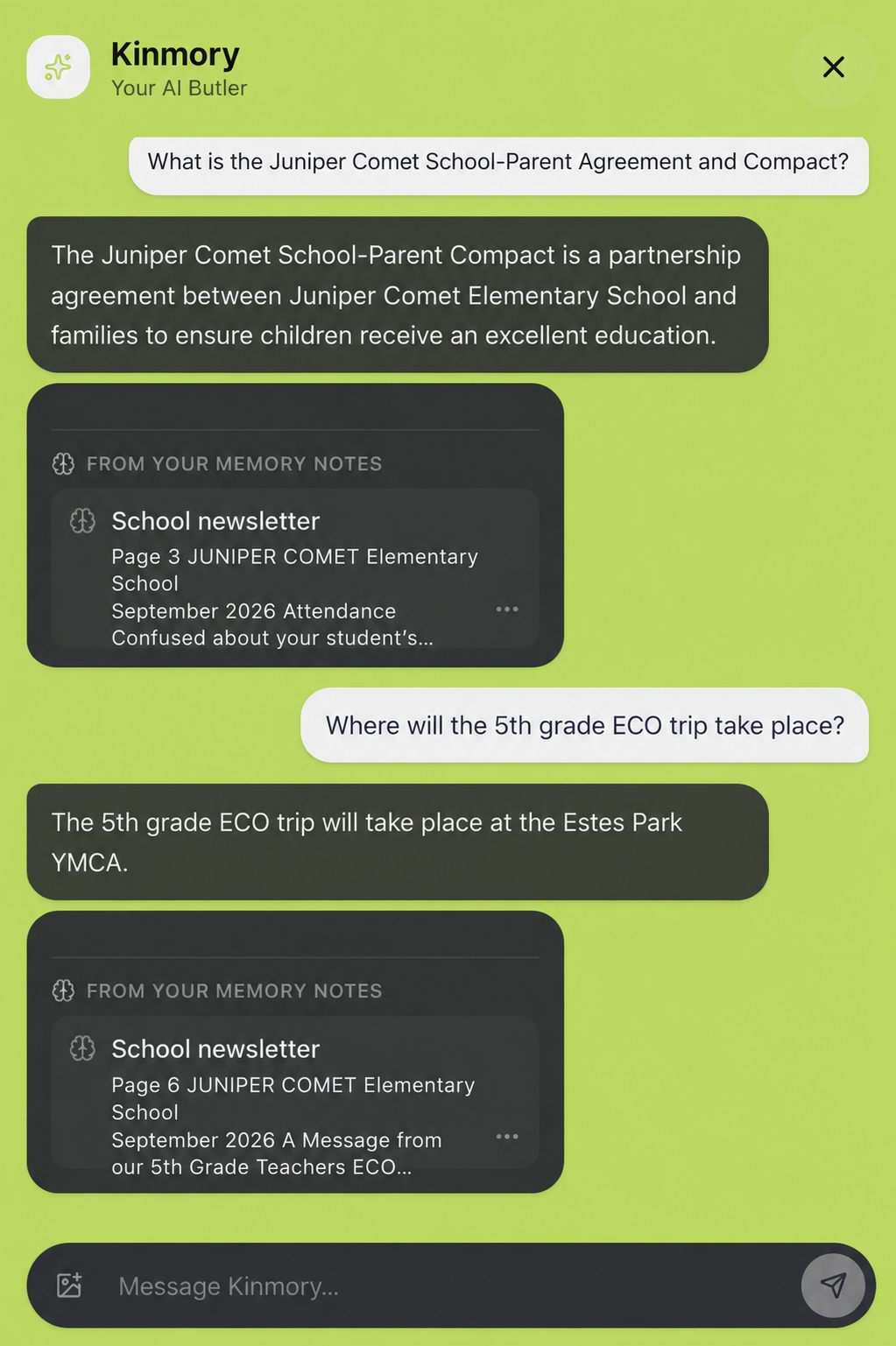
Useful Newsletter information saved to Family Memory can remain searchable after the original inbox context is forgotten. Kinmory can answer an everyday-language question from the selected source and show available source information so the family can verify it. This page keeps retrieval brief because the complete scenario has its own guide: see how to find school Newsletter information weeks later.
What does “automatically” not mean yet?
It does not mean Kinmory watches every possible school channel or makes every decision without you. The current product analyzes a supported source after it is provided through a supported workflow. Suggestions remain reviewable, and extraction may be incomplete.
- Kinmory does not currently crawl a school's public newsletter webpage on a schedule.
- This page does not claim a direct integration with a school portal or ParentSquare.
- This page does not promise automatic parsing of every PDF or email attachment.
- Automatic collection does not mean every message must be analyzed: whitelist mode accepts only matching senders, while blacklist mode excludes matching senders.
- Kinmory does not automatically create every suggested calendar event or task without user review.
- Kinmory does not guarantee that every detail is extracted or that it can determine which conflicting record is true.
Those missing connectors are sensible future additions, especially for newsletters that exist only on a public school webpage or inside a portal. Today the supported email promise is: forward a message deliberately, or automatically collect only the new messages allowed by your sender rules, then review the suggestions.
When should you use a calendar subscription instead?
Use a calendar subscription whenever the school, district, or team provides one. Kinmory supports iCal subscriptions as well as Google Calendar, Outlook Calendar, and TeamSnap calendars. A feed is preferable for a complete schedule because changes can continue to flow from the official calendar source.
Email parsing solves a different problem: dates mentioned in narrative communication. A principal's weekly note may include a spirit day, an early dismissal, and a form deadline that never appear in a clean calendar feed. In practice, families need both: subscriptions for structured schedules and parsing for the information trapped in messages and flyers.
Is this different from a general email-to-calendar app?
Yes—the school use case is multi-format and family-shared. A general converter may handle one email and one personal calendar. School logistics arrive as emails, screenshots, paper handouts, and team feeds, and the result needs to be visible in the household's planning system.
If you are comparing broader tools and their ingestion models, see our email-to-calendar apps for families. If your main decision is the shared family system itself, use the family calendar app comparison.
Continue with the product: Explore the official Kinmory Family Memory workflow to see how a newsletter, photo, or selected family file moves from capture to a verifiable answer and an action you approve.
Frequently asked questions
Is there an app that automatically adds dates from school newsletters to a family calendar?
Kinmory can analyze a supported school newsletter after a parent shares it and suggest calendar events for dated activities or deadlines. The user reviews and chooses which suggestions to create.
Can a school newsletter become tasks as well as calendar events?
Yes. Kinmory can suggest tasks for actions such as registering, submitting a form, paying a fee, preparing materials, or contacting the school. Users can edit, accept, or ignore each suggestion.
Can Kinmory remember school information that is not an event or task?
Yes. Useful reference information can be saved as searchable Family Memory, so a parent can later ask about contact details, school instructions, activity updates, or other saved facts and review the available source.
Where does Kinmory store the original school newsletter?
The user can keep the newsletter in Kinmory or save it to a configured supported external storage location such as Dropbox or OneDrive. Kinmory can query the selected source later and show available source information with its answer.
Is Family Memory free?
Family Memory uses paid AI features. Kinmory may be free to start, but availability of Family Memory depends on the current plan and entitlement listed on the official pricing page.
Can Kinmory read a school newsletter on a website?
Not automatically today. You can share a screenshot of the relevant webpage with Kinmory, but this page does not claim scheduled crawling of public school newsletter pages.
What if the school sends a paper flyer?
Take a photo of the paper flyer and upload it to Kinmory. That provides a capture path for dates and reminders that never arrive as email or a calendar feed.
Does Kinmory support school and sports calendar feeds?
Kinmory supports iCal subscriptions, Google Calendar, Outlook Calendar, and TeamSnap calendars. Use a feed when one is available, especially for schedules that may change.
Does Kinmory monitor every email in my inbox?
No. A parent can forward selected messages or enable automatic collection with an all-email, whitelist, or blacklist scope. Excluded new messages are stopped before their subject, body, MIME data, or attachments are read. Forwarded messages are always analyzed.
Related reading
- How to Turn Your TV Into a Family Calendar with KinTV
Turn an Android TV or Google TV into a shared family calendar with KinTV. See schedules, tasks, meals and photos without buying another screen.
- Family Travel Details, Easy to Find | Kinmory.AI
Keep hotel addresses, check-in times, confirmations, and plans together. Practical tips to help the whole family find travel details fast.
- How Children Build Self-Direction in Grades 2–4
An evidence-informed framework for helping children start tasks, regulate effort, and become less dependent on adult prompting.
- A Family Organization System Should Survive a Busy Week
A resilient family organization system favors quick capture, visible next actions and easy recovery over perfect routines and constant maintenance.
Turn one school email into a family plan.
Let Kinmory suggest calendar events, family tasks and reference information. You review what gets saved.

Get the Mobile App
Scan with your phone
kinmory.ai/download/kinmory