

Screen Time Meltdowns: A 3-Step Transition Routine
Help your child end screen time with less conflict using a three-step transition routine, practical scripts, age-based examples, and a seven-day plan.
A practical routine for helping children move from a screen to the next part of the day—with less arguing and fewer repeated reminders.
For parents and caregivers of children roughly ages 4–12. Adapt the words and choices to your child’s age and needs.
You say, “Screen time is over.” Your child asks for one more minute. Then one more video. Then the device goes off—and suddenly the whole evening feels stuck.
It is easy to assume that the screen itself is the entire problem. Sometimes it is not. The difficult moment may be the transition: stopping something absorbing, accepting disappointment, and beginning a less exciting next activity.
That does not mean every screen-time meltdown is harmless, or that limits do not matter. It means the handoff deserves its own plan.
Why turning off a screen can feel so hard
Imagine being interrupted near the end of a gripping film and told to start folding laundry immediately. You may understand the rule and still dislike the switch.
Children have the same basic challenge, with less experience managing frustration and shifting attention. Games, videos and social feeds are also designed to keep the next reward close: one more level, clip or episode.
The American Academy of Pediatrics’ parent guidance notes that difficulty stopping does not automatically mean a child is addicted to technology. It recommends planning limits in advance, staying calm and holding the boundary when a meltdown happens.
A warning can help, but it is not magic. A child may still protest. Hunger, tiredness, stress and an unfinished game can all make the switch harder. Treat the routine as support, not a guarantee.
Step 1: Preview the ending
Do not make the first sign of the limit the moment you take the device away. Give a short, predictable preview using the same pattern each day.
Try saying
“Ten minutes left. Then the screen goes off and we put on shoes.”
Follow with one shorter reminder: “Two minutes. Finish this part, then shoes.”
The warning works best when it answers two questions: When does this end? and What happens next?
For younger children, use a visual timer or a familiar event: “When this episode ends, the tablet rests.” For older children playing an online game, agree before they start whether they may finish the current round or must stop at a fixed clock time.
Avoid starting a negotiation at every warning. “Would you like to stop now?” sounds like the limit is optional. “Ten minutes left” is information.
What if timers make things worse?
Some children watch the countdown and become more anxious. Try an event-based cue instead: the end of an episode, the completion of one round, or a family alarm with a neutral sound. Let your child help choose the cue when everyone is calm.
The child can have a voice in the plan without deciding whether the boundary exists. The AAP’s Family Media Plan guidance similarly encourages families to discuss rules together and revisit them as children grow.
Step 2: Name one concrete next action
“Screen off” tells a child what must stop. It does not tell them how to begin the next part of the evening.
Replace broad instructions such as “get ready” or “go do something else” with one visible action:
- “Put the tablet on the charger.”
- “Bring your plate to the table.”
- “Choose the blue towel or the green towel for your bath.”
- “Put on your shoes and meet me by the door.”
One action is easier to start than a chain of five. Once it is underway, give the next instruction if needed.
Try saying
“The screen is finished. First, place it on the charger. I’ll meet you there.”
The next activity should be ready when possible. If you say “let’s make a snack,” have the choices available. If you promise outdoor play, make sure leaving the house is realistic. An empty transition invites another round of bargaining.
Step 3: Offer a choice inside the boundary
A useful choice gives your child some control without reopening the screen-time decision.
Try saying
“Screen time is finished. Do you want to walk to the kitchen or hop like a frog?”
For an older child: “The game is finished. Homework or shower first—you choose.”
Keep the choice small and real. Offer two options you can accept. If your child refuses both, calmly choose one: “You’re not ready to choose, so we’ll start with the shower.”
A choice is not a bribe. You do not need to offer a treat every time a screen turns off. The choice simply makes the path forward clearer.
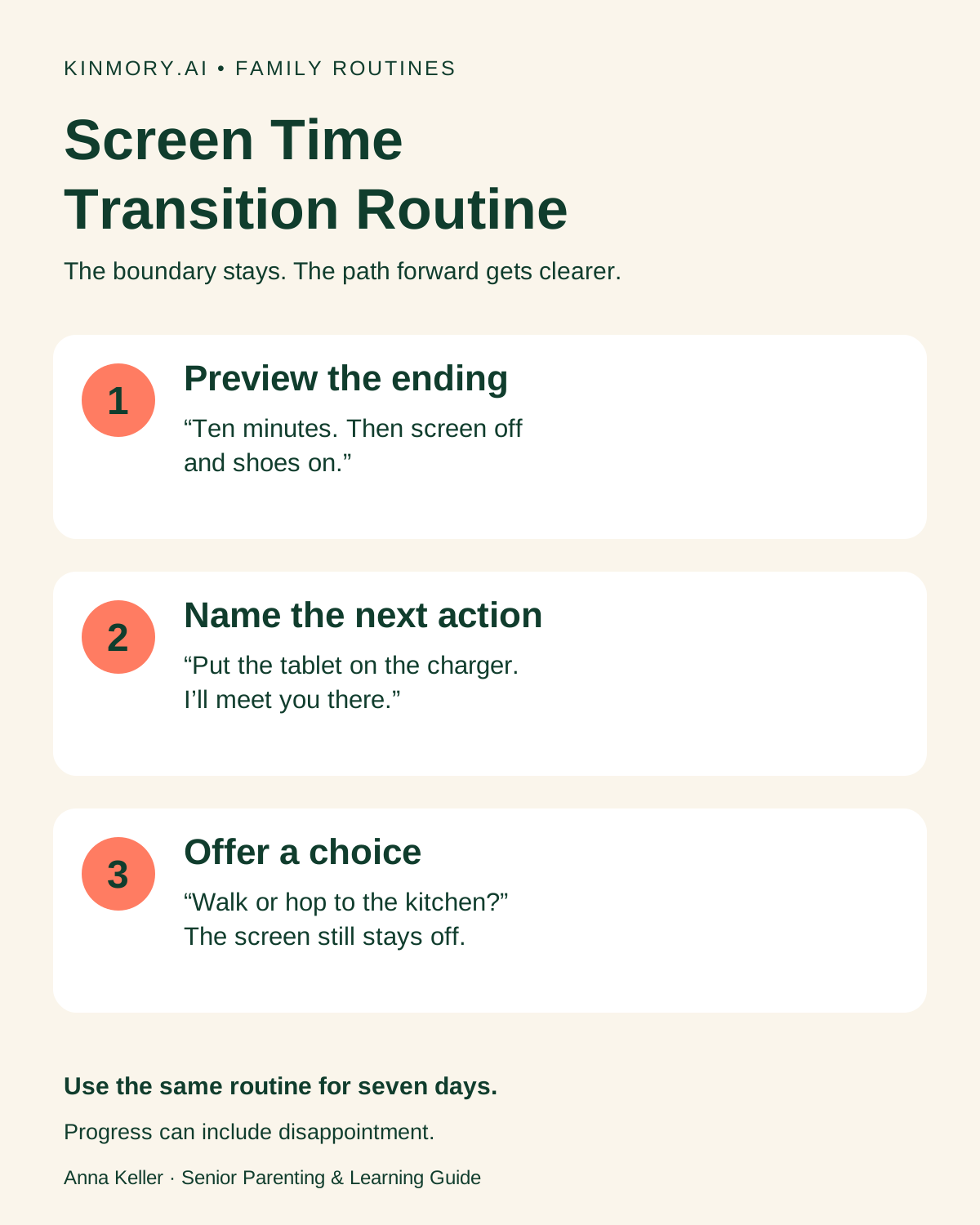
Save the three-step transition card.
What to do during the meltdown
Once a child is shouting or crying, it is usually not the best moment for a long explanation. Use fewer words, keep the limit clear and focus on safety.
You can acknowledge the feeling without changing the decision: “You wanted more time. You’re disappointed.” Avoid debating whether the rule is fair while emotions are high.
If your child becomes physically unsafe, move the device and other people out of reach and follow the safety plan that fits your family. Discuss what happened later, after everyone is calm.
How to adapt the routine by age
| Age range | Keep it simple | Example |
|---|---|---|
| 4–6 | One warning, one physical next step, two playful choices. | “Episode ends, tablet rests. Walk or hop to the bath?” |
| 7–9 | Let the child help choose the warning cue and next activity. | “Ten minutes, then charger. Snack or shower first?” |
| 10–12 | Agree on stopping rules before play, especially for multiplayer games. | “This round is the last one. At 7:00, shower or school bag first?” |
These are starting points, not developmental rules. Some children need more visual support, more time or fewer words. Children with ADHD, autism, anxiety or sensory differences may find transitions especially demanding; work with the professionals who know your child when you need an individualized plan.
A seven-day practice plan
Do not change the script every night. Repetition is what turns three separate reminders into a familiar routine.
- Choose one transition. Start with the most predictable one, such as tablet-to-dinner.
- Write the three steps. Decide on the warning, the first next action and two acceptable choices.
- Explain it before screen time. Keep the explanation brief.
- Use the same words for seven days. Adjust only if the plan is clearly unrealistic or unsafe.
- Notice the smallest improvement. Did your child put the device down after one reminder instead of four? That counts.
Track the process, not just whether your child looked happy. A successful transition may still include disappointment.
Put the routine somewhere the family can see it
A note beside the charger may be enough. If your family already uses Kinmory, you can turn the transition into a recurring family task:
- Task: Finish screen time
- Reminder: Ten minutes before dinner
- Checklist: Charger → shoes → choose music or audiobook
- Repeat: School nights
Kinmory can keep the sequence visible alongside your family’s other routines. Explore Kinmory’s family organizer and recurring tasks. The tool provides the reminder; the parent still sets the boundary and supports the child.
If your child is also working on independent routines around schoolwork, Anna’s guide to helping children catch homework mistakes uses the same principle: replace a vague instruction with a small, repeatable process. For children who need more immediate encouragement to begin everyday responsibilities, see how virtual pet feedback can support family habits without rewarding every task.
Watch Anna demonstrate the routine
This short walkthrough shows the three steps and the exact wording you can adapt at home.
Watch the 1-minute, 48-second video on YouTube.
Frequently asked questions
How many warnings should I give before screen time ends?
Start with one clear warning and one short final reminder. Repeating the warning many times can turn it into background noise. The exact timing matters less than using a predictable pattern your child understands.
Should I take the device away when my child refuses?
Hold the boundary as calmly and safely as you can. Device settings and a shared charging location can reduce physical struggles. If removing the device regularly becomes unsafe, ask your child’s pediatrician or another qualified professional for individualized support.
Does a meltdown mean my child is addicted to screens?
No. Resistance at the end of an enjoyable activity does not by itself establish problematic media use. Look at the wider pattern, including sleep, hygiene, eating, school, relationships and whether your child can enjoy other activities.
When should I seek professional help?
Talk with your child’s pediatrician if severe meltdowns happen nearly every time, become unsafe, or come with meaningful changes in sleep, hygiene, eating, school participation or social life. Bring examples of what happens before, during and after the transition.
Sources and scope
- American Academy of Pediatrics: Screen Time & Temper Tantrums
- American Academy of Pediatrics: How to Make a Family Media Plan
- AAP policy statement: Digital Ecosystems, Children, and Adolescents
This article offers general educational guidance, not medical or behavioral-health diagnosis or treatment. Families and children differ; use professional advice when concerns are persistent, severe or unsafe.
Related reading
- How to Help Kids Catch Careless Homework Mistakes
Help your child catch homework mistakes with three practical habits, a four-step checklist, and less nagging. A guide for parents by Anna Keller.
- How to Motivate Kids to Do Chores with Virtual Pet Rewards
Use immediate virtual pet feedback and longer-term family rewards to make chores easier to start—without turning every responsibility into a prize.
- How to Turn Any Tablet Into a Family Calendar (2026)
Reuse an iPad or Android tablet as an always-on family calendar with kid-safe locks, Today view, tasks, meals, photos, and shared lists.
- Meet Kinmory AI Recipes: Create, Import, Personalize, and Share
Discover AI Recipes in Kinmory, the family organization and planning app. Create recipes with AI, import from the web, personalize, and share.
Bring your family's plans into one place.
Use Kinmory on the web or phone to share calendars, tasks, meals and the information your household needs next.

Scan to Download
Point your camera here
kinmory.ai/download/kinmory